Agentic AI Patterns
Over the last year I’ve been building and reviewing a lot of agentic AI systems. Some were internal copilots. Some were multi-agent workflows. Some looked amazing in demos and completely collapsed once real users started interacting with them 😄
After a while I noticed the same patterns showing up again and again
Not just prompt patterns. Actual architecture patterns
Things like:
- how agents access tools ?
- how agents communicate ?
- where guardrails should sit ?
- how evaluations should run ?
- how memory should work ?
This post is basically a collection of notes and patterns that I keep coming back to while designing production-grade systems
I will say that it is not meant to be a perfect academic explanation. Think of it more like architecture notes from someone trying to make these systems survive production traffic, weird user behavior and enterprise security reviews 😄
High Level Agentic AI Architecture 🏗️
When people first hear the term Agentic AI, they often imagine a chatbot with a few tools attached to it
In reality, once you start building enterprise systems, the architecture becomes much bigger very quickly
The diagram below is roughly how I think about a modern enterprise agentic AI stack today
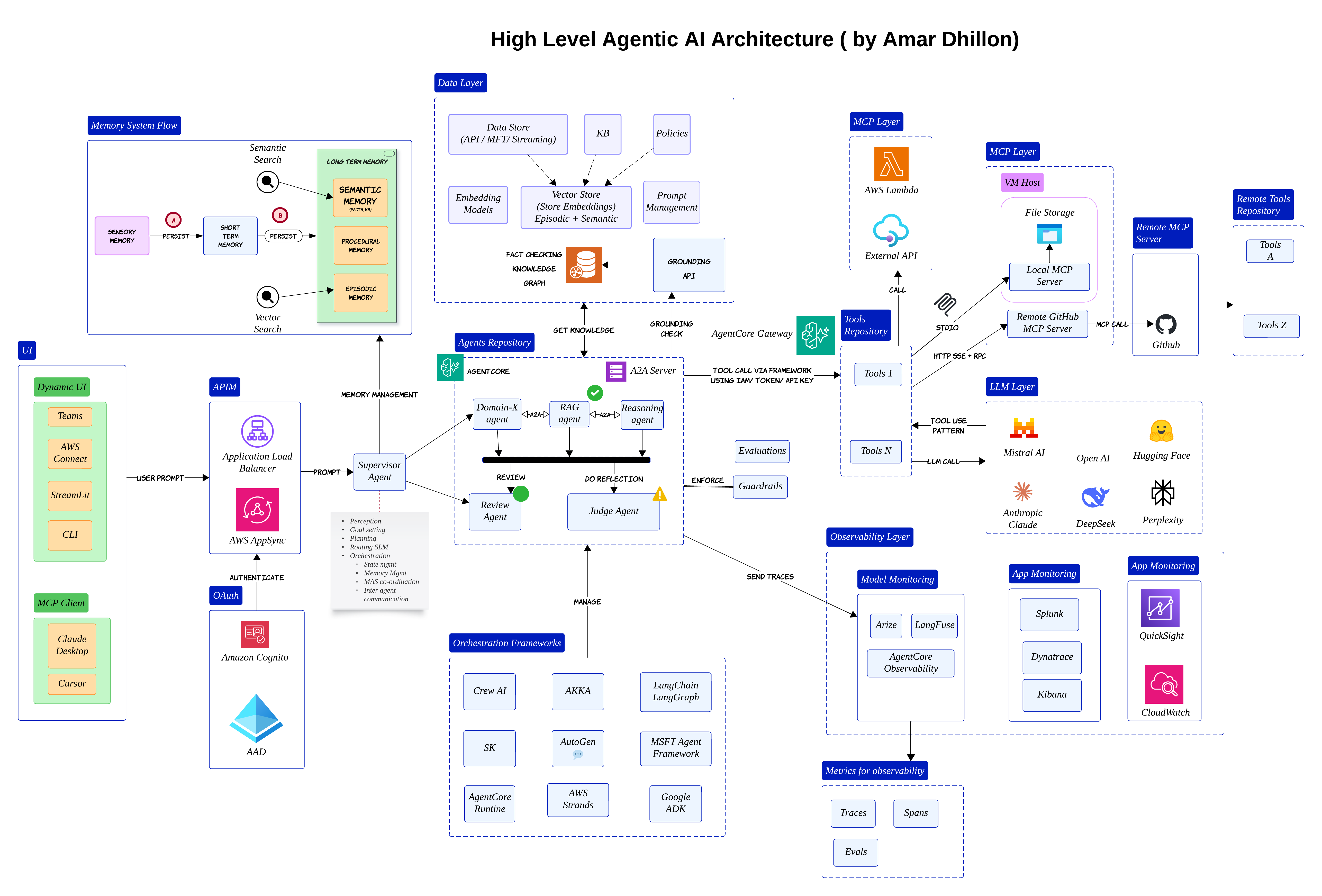
At the center, you still have LLMs and agents. But around them, there are many supporting layers:
- Orchestration
- Memory
- Tools
- Evaluations
- Observability
The user may come from Teams, Streamlit, a web app or even another MCP client. The request usually lands behind an API gateway and then reaches some kind of supervisor or orchestrator
That orchestrator becomes the brain of the system. It decides whether the request should go to a RAG agent, a reasoning agent or perhaps a review agent
Important shift
Most enterprise AI systems are no longer "single chatbot" systems. They are slowly becoming distributed AI workflows with multiple cooperating components
One thing I learned pretty early is that orchestration becomes more important than the prompt itself. A great model with weak orchestration still behaves badly in production
Why MCP Matters 🔌
Once the orchestrator starts delegating work, another problem appears very quickly
How does the agent safely interact with external systems?
Most teams initially hardcode integrations directly into orchestration logic. That works for demos. It becomes painful very quickly once you have dozens of tools and APIs
That is where MCP starts becoming useful
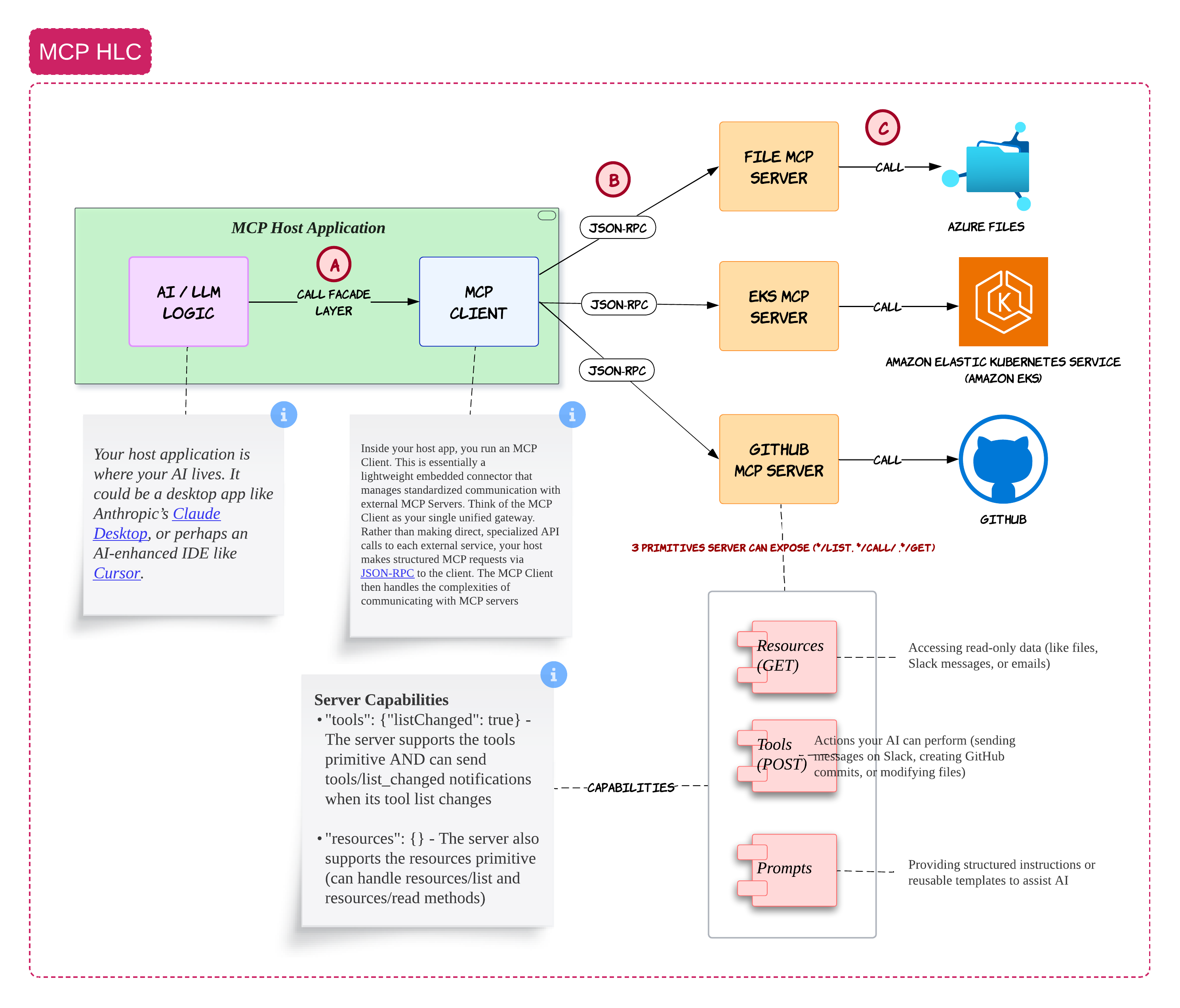
The way I think about MCP is pretty simple
The host application contains your AI logic. This could be something like Claude Desktop, Cursor or your own internal AI portal
Inside the host application, you run an MCP client. That MCP client becomes the standardized bridge between your AI system and external services
Those external services are exposed through MCP servers
For example:
- a GitHub MCP server
- a file MCP server
- an EKS MCP server
Instead of the LLM directly talking to everything in your enterprise, it goes through a controlled layer
That controlled layer becomes extremely important because now you can apply:
- permissions
- logging
- policy checks
Why this matters
In enterprise environments, the hardest problem is usually not model intelligence.
It is controlled and auditable access to enterprise systems
MCP Starts Looking Like a Tool Operating System 🧰
After building a few systems with MCP, I slowly stopped thinking about it as just a protocol
It started feeling more like a lightweight operating system for tools
The agent handles reasoning. MCP handles capabilities
The agent might decide:
"I need to fetch a Kubernetes deployment"
Or:
"I need to update a GitHub issue"
But the actual execution happens through MCP servers
This separation becomes very useful because your reasoning layer and tool layer evolve independently
Common mistake
Many teams expose overly powerful tools directly to agents.
Start with narrow scoped tools first and slowly expand capabilities
A2A: Agents Talking to Other Agents 🤝
Once agents become more specialized, another challenge appears
How do agents collaborate with each other?
This is where A2A becomes interesting
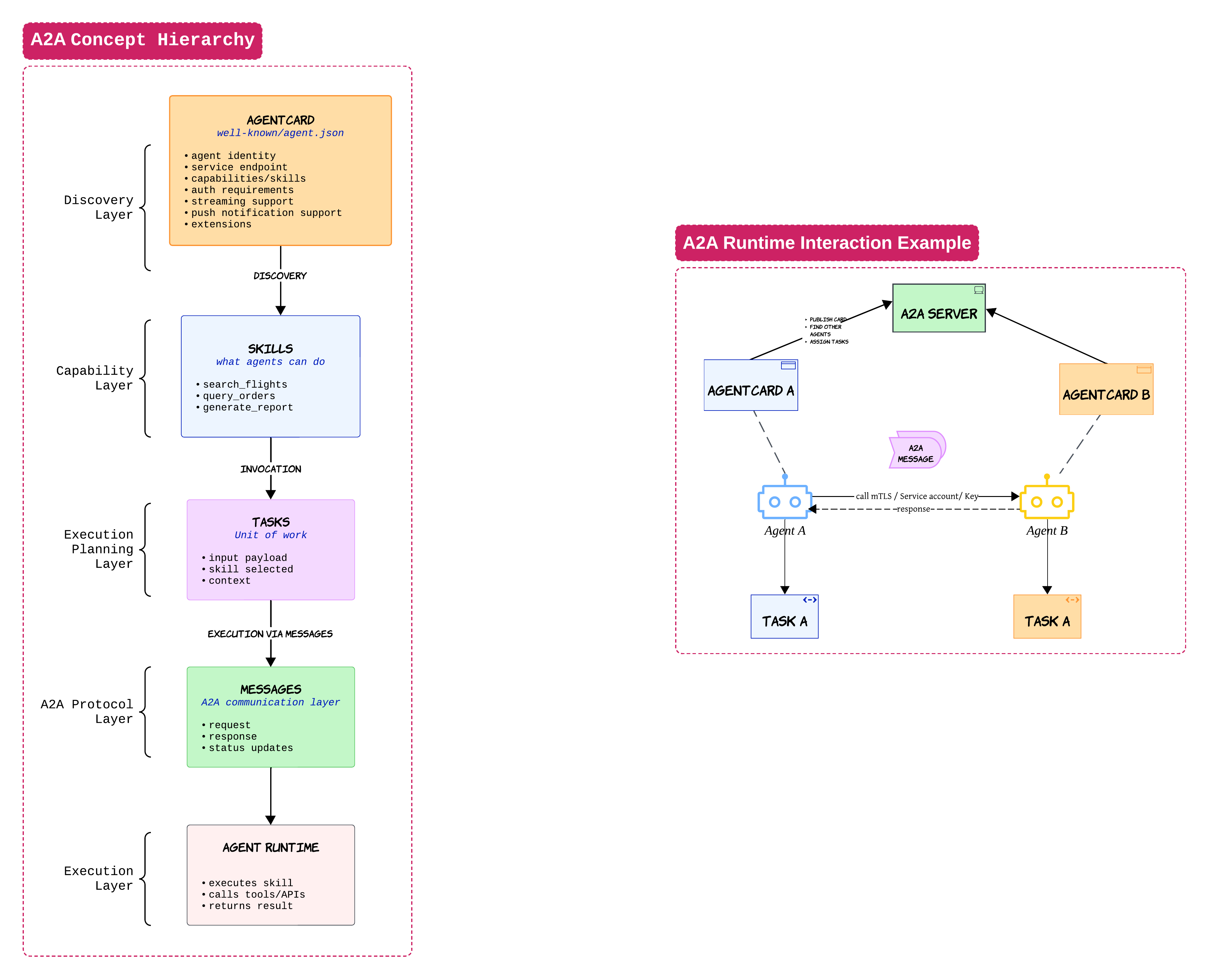
When I first looked at A2A, I thought it was competing with MCP. After building a few systems, I realized they solve completely different problems
MCP is mostly about agents talking to tools
A2A is about agents talking to other agents
An agent card is one of the most important concepts here. Think of it like a public profile for an agent
It tells other agents:
- what the agent can do
- where it lives
- how to authenticate
Once another agent discovers this information, it can delegate work using tasks and messages
A travel agent may ask a hotel agent to handle accommodations. That hotel agent may then call tools through MCP
This is why MCP and A2A usually end up existing together inside larger systems
Practical advice
Start with a single orchestrator first.
Multi-agent collaboration sounds exciting but debugging distributed reasoning flows can become chaotic very quickly 😄
RAG Is Still One of the Most Useful Patterns 📚
Even with all the excitement around agents, RAG is still one of the most practical patterns in enterprise AI
But there is a lot of confusion around what RAG actually solves
RAG is not memory
RAG is not orchestration
RAG is mostly retrieval + grounding
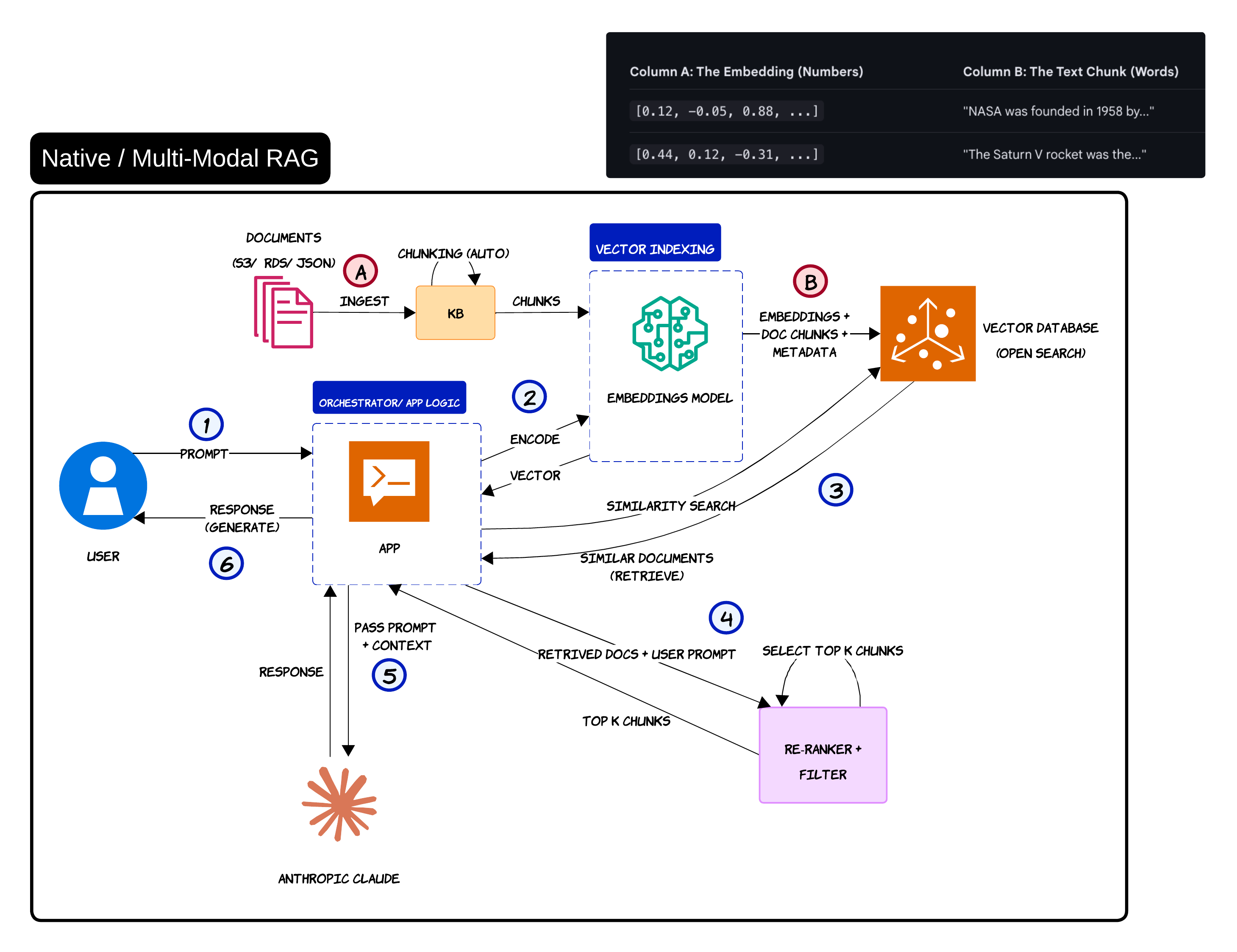
The basic flow is straightforward
Documents are ingested, chunked, embedded and stored inside a vector database
When the user asks a question, the query gets converted into embeddings. The system retrieves the most similar chunks and injects them into the LLM prompt
That grounding step is what helps reduce hallucinations
A lot of teams underestimate how far simple RAG can take them. To be honest, many systems do not need complicated memory architectures on day one
Common misconception
Many people treat RAG as memory.
RAG retrieves information. Memory usually evolves over time and becomes stateful
Graph RAG and Multi-Modal Retrieval 🕸️
Simple vector retrieval works well for many use cases. But eventually you run into situations where semantic similarity alone is not enough
That is where Graph RAG becomes interesting
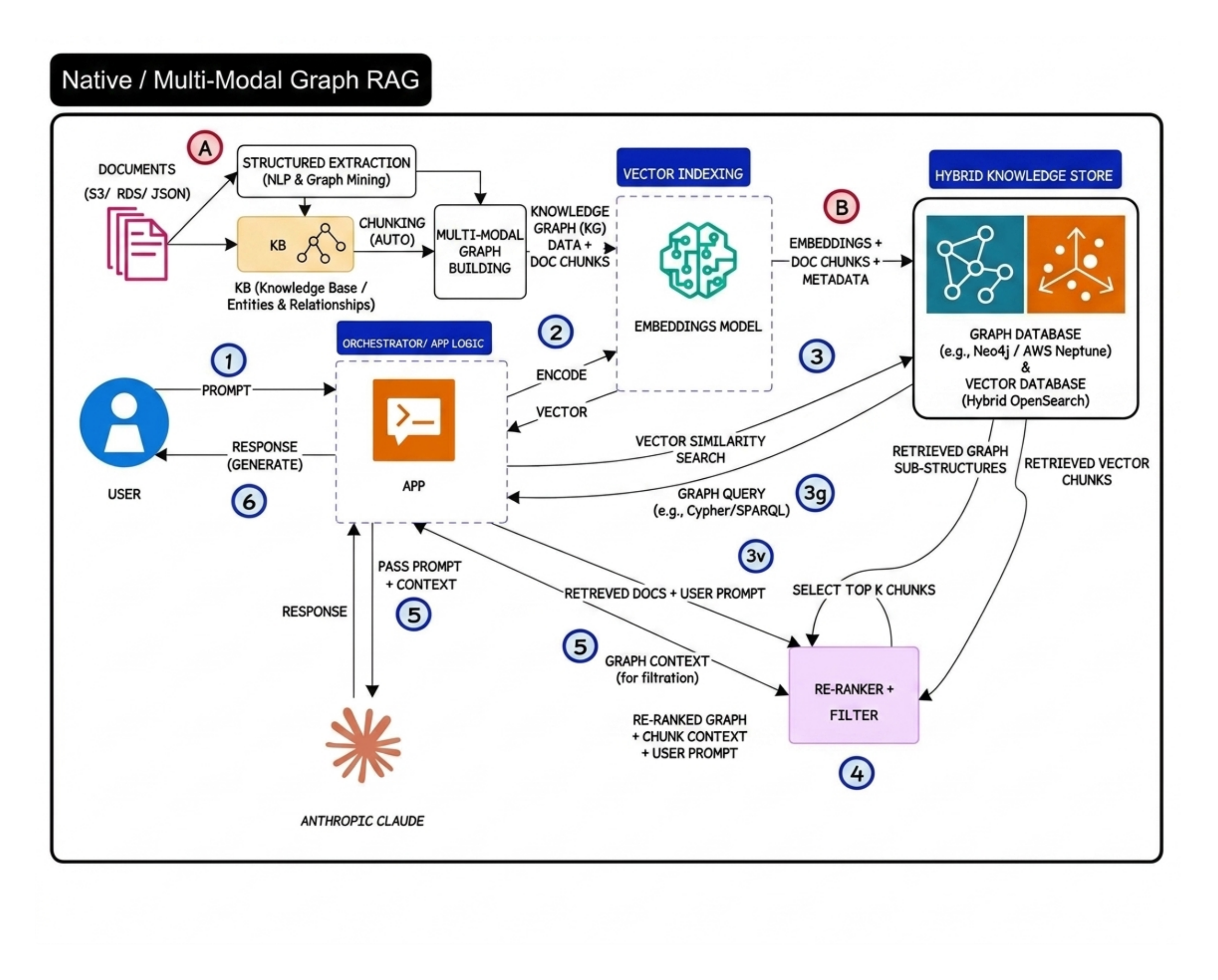
The big idea behind Graph RAG is relationship awareness
Instead of only retrieving similar chunks, the system also understands how entities connect with each other
A good example is airline disruption management
A vector database may retrieve compensation policy chunks. But a graph-aware system can additionally reason over relationships between:
- customer tier
- disruption type
- route history
That extra relationship context becomes extremely valuable in reasoning-heavy workflows
Reality check
Graph RAG is powerful but it also increases operational complexity significantly.
Most teams should start with simple vector RAG first
Prompt Engineering vs RAG vs Fine-Tuning 🧪
This is probably one of the most misunderstood topics in GenAI right now
People often use these terms interchangeably even though they solve very different problems
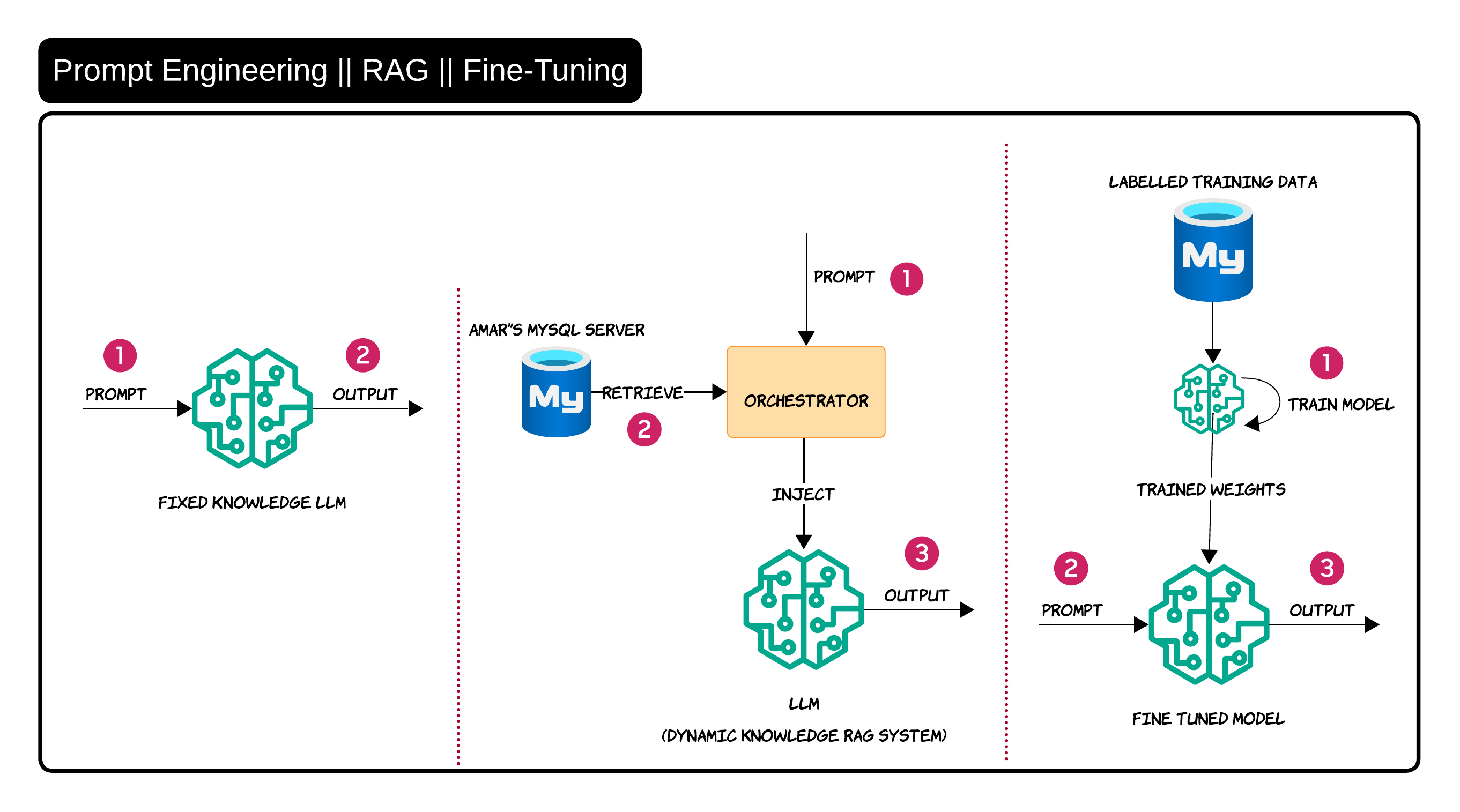
Prompt engineering is mainly about improving instructions
RAG is about injecting external knowledge dynamically
Fine-tuning is about changing model behavior through training data
I usually explain it like this:
- If the model needs better guidance → prompt engineering
- If the model needs enterprise knowledge → RAG
- If the model needs behavioral adaptation → fine-tuning
In real enterprise systems, RAG is usually the first practical step because enterprise knowledge changes constantly. Nobody wants to retrain a model every time a policy document changes 😄
Guardrails Need Multiple Layers 🛡️
One thing that becomes obvious very quickly in production is that a single moderation layer is not enough
Guardrails need to exist throughout the entire workflow
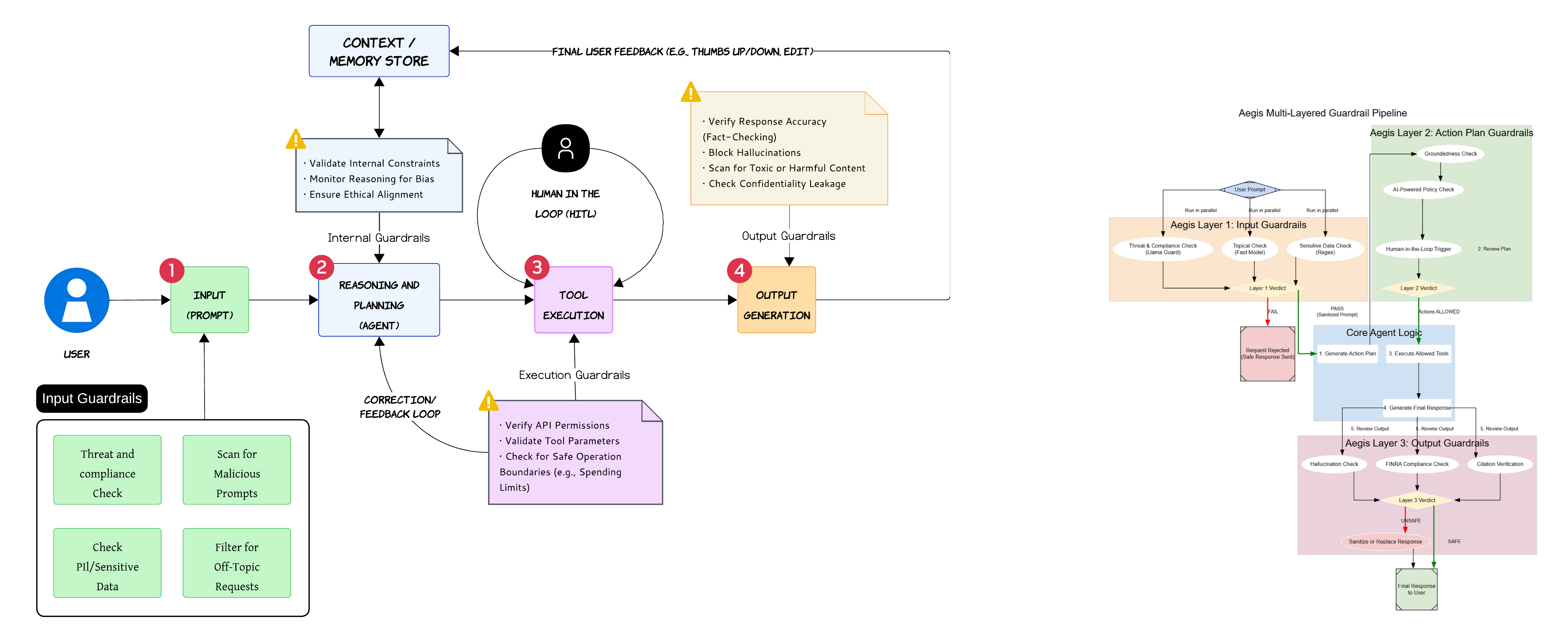
Input guardrails help filter malicious prompts and sensitive data before the request reaches the agent
Internal guardrails monitor reasoning quality and policy alignment while the agent is thinking
Execution guardrails validate tool permissions and parameter safety before actions happen
Output guardrails validate hallucinations, confidentiality leakage and harmful responses before anything reaches the user
Important
Most dangerous failures happen during tool execution and not during text generation
One of the biggest mistakes teams make is focusing entirely on output filtering while ignoring execution safety
Agent Mesh Defense with Gateways and Sidecars 🧱
As systems become more distributed, service mesh style thinking starts becoming useful for agents too
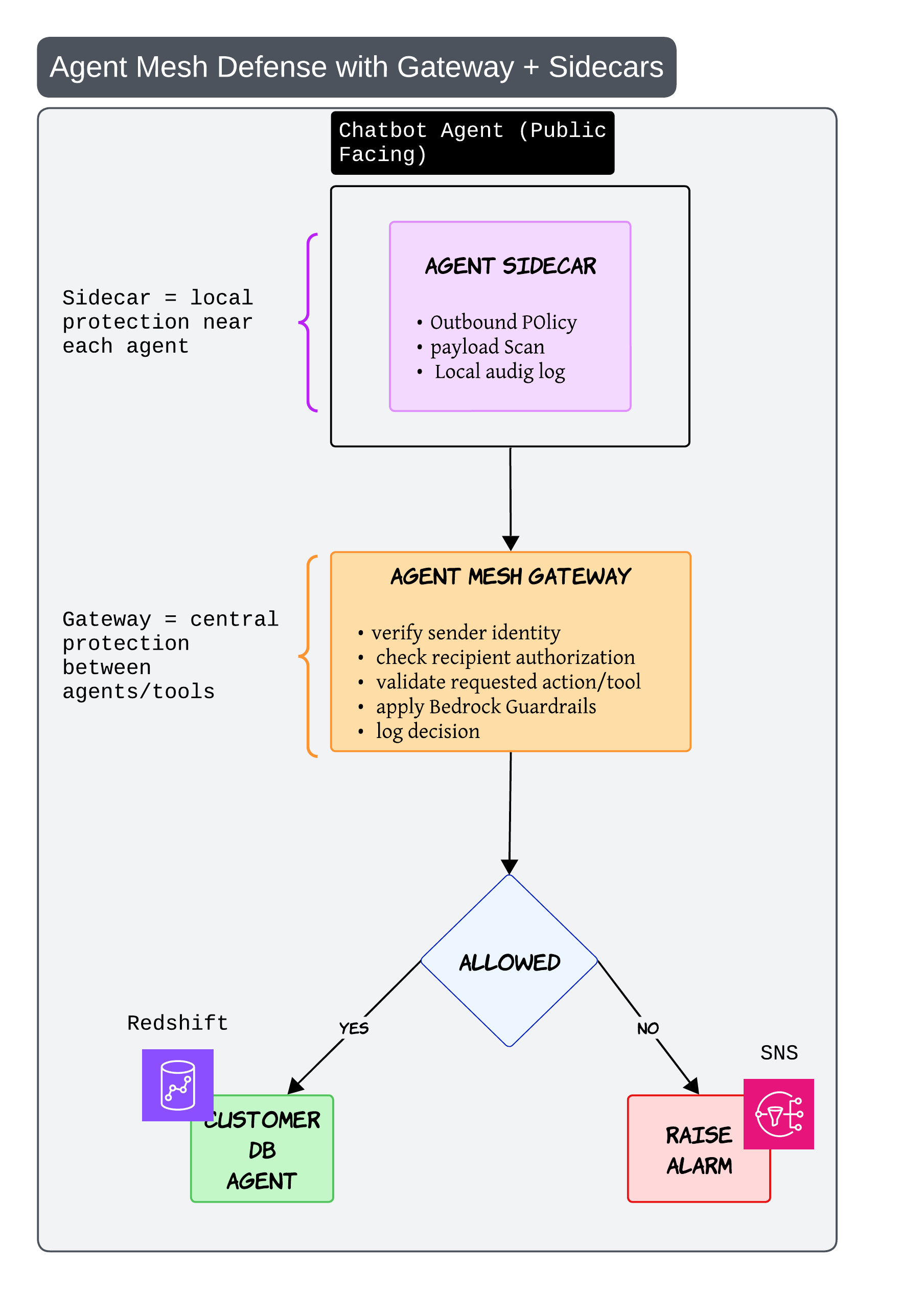
The sidecar acts like local protection near each agent
It can: - inspect payloads - enforce outbound policy - maintain local audit logs
The gateway acts like centralized protection between agents and tools
It verifies: - sender identity - requested action - authorization
This becomes especially important once multiple agents start calling each other dynamically
Without this kind of architecture, one badly behaving agent can create problems across the entire system very quickly
Sandboxing and Least Privilege 🧯
This pattern sounds boring in diagrams but becomes incredibly important in production
Especially once agents start generating code or executing actions
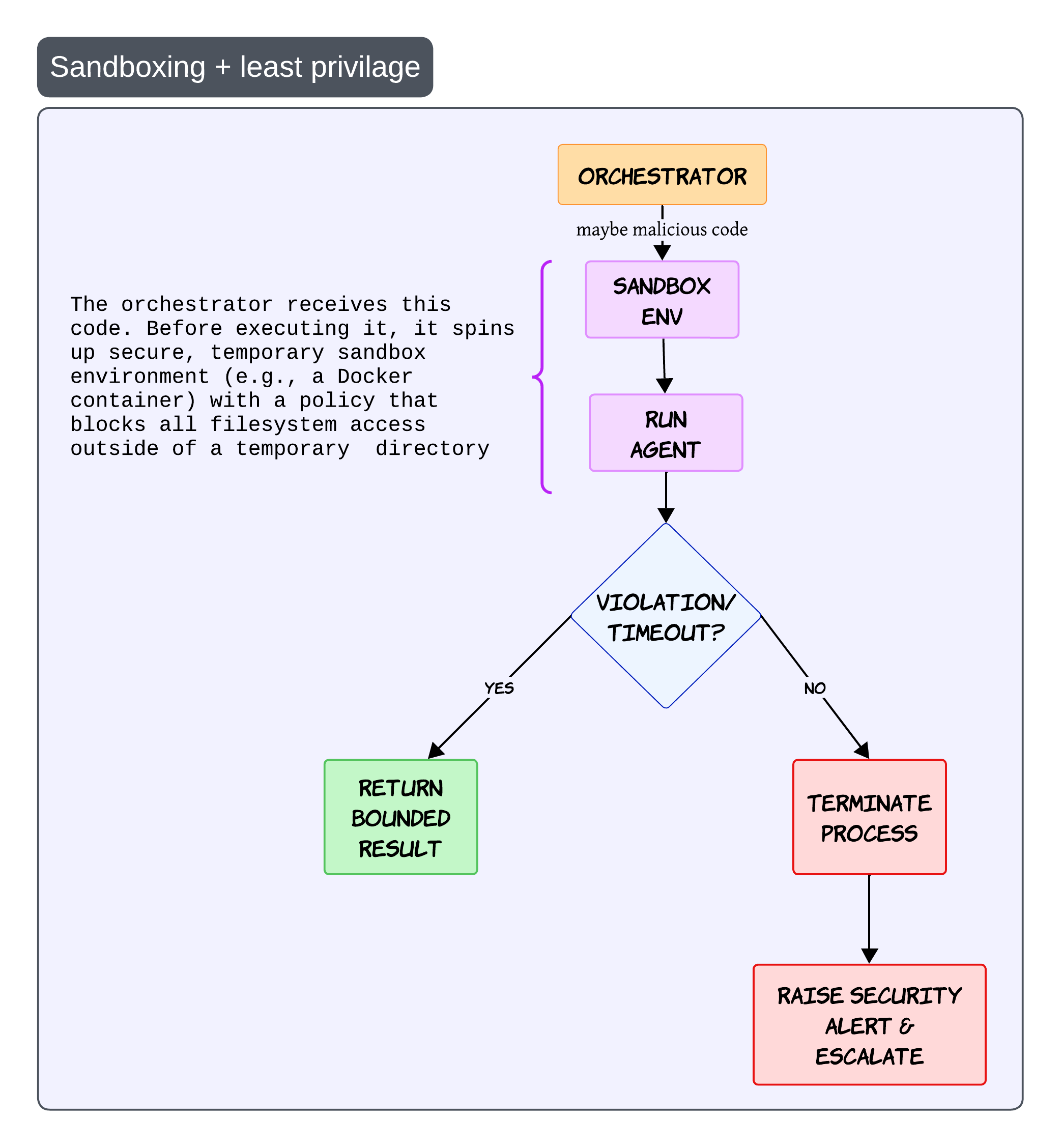
The idea is simple
Before running risky operations, create a temporary isolated execution environment
This could be: - Docker containers - microVMs - isolated runtimes
The sandbox should have strict policies with minimal filesystem access and tightly scoped permissions
If the execution violates policy or exceeds limits, terminate the process immediately and raise an alert
Never trust generated code blindly
Even if the generated code looks harmless, always assume the execution path can become unsafe
Fallback Model Invocation for Reliability 🔁
Sooner or later every model provider fails 😄
There will be: - outages - invalid outputs - latency spikes
That is why fallback strategies become important
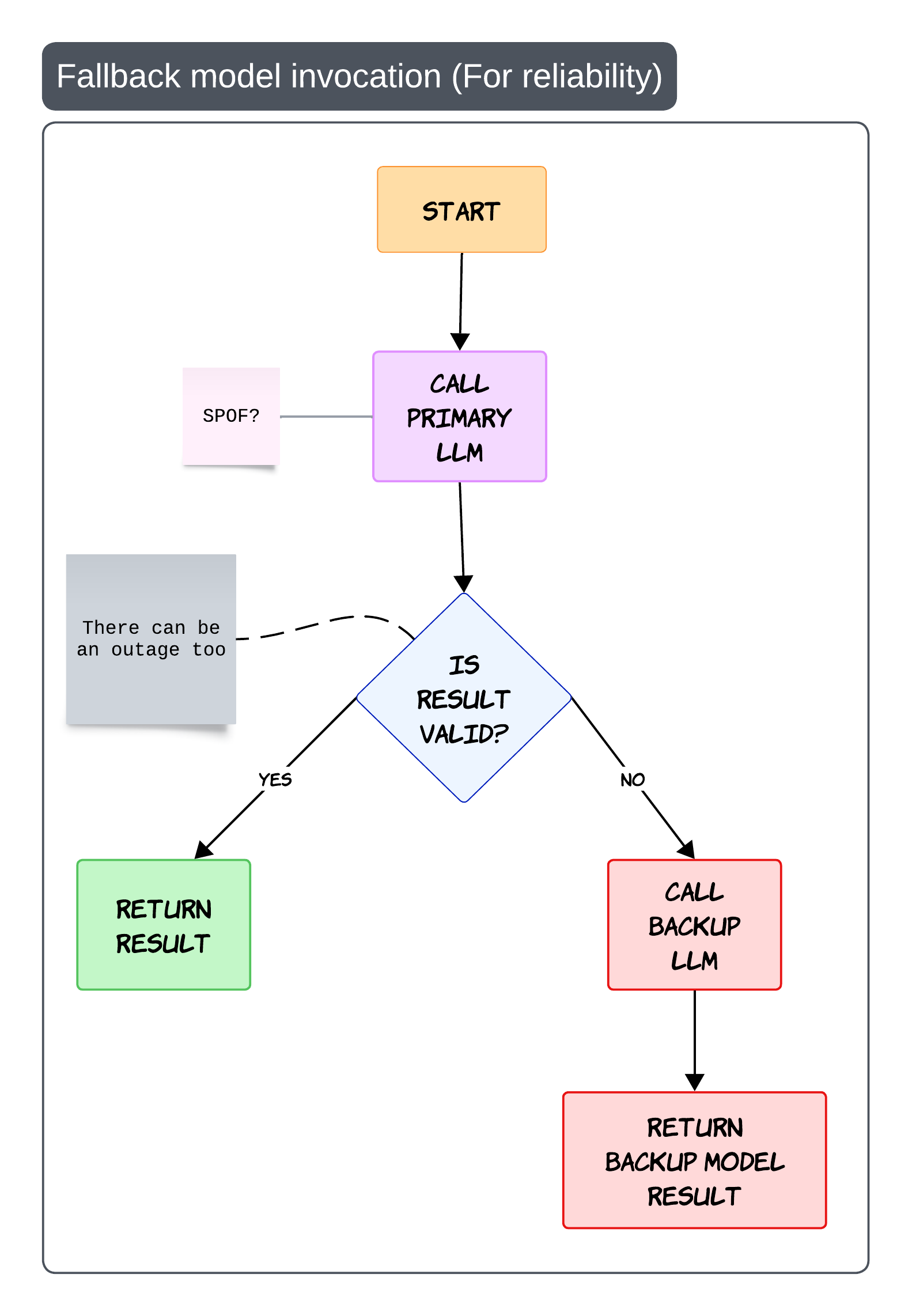
The simplest flow is: - call the primary model - validate the output - fallback if needed
The important part is validation
Fallback should not only trigger on API failure. It can also trigger when: - schema validation fails - grounding fails - safety checks fail
This prevents your entire platform from becoming dependent on a single provider
Practical production advice
Keep backup prompts optimized separately.
Different models often behave very differently with the same prompt
Evaluations Are the Real Engineering Loop 📊
One thing I’ve learned while building GenAI systems is this:
Most teams spend too much time building and not enough time evaluating
Without evaluations, improvement becomes guesswork
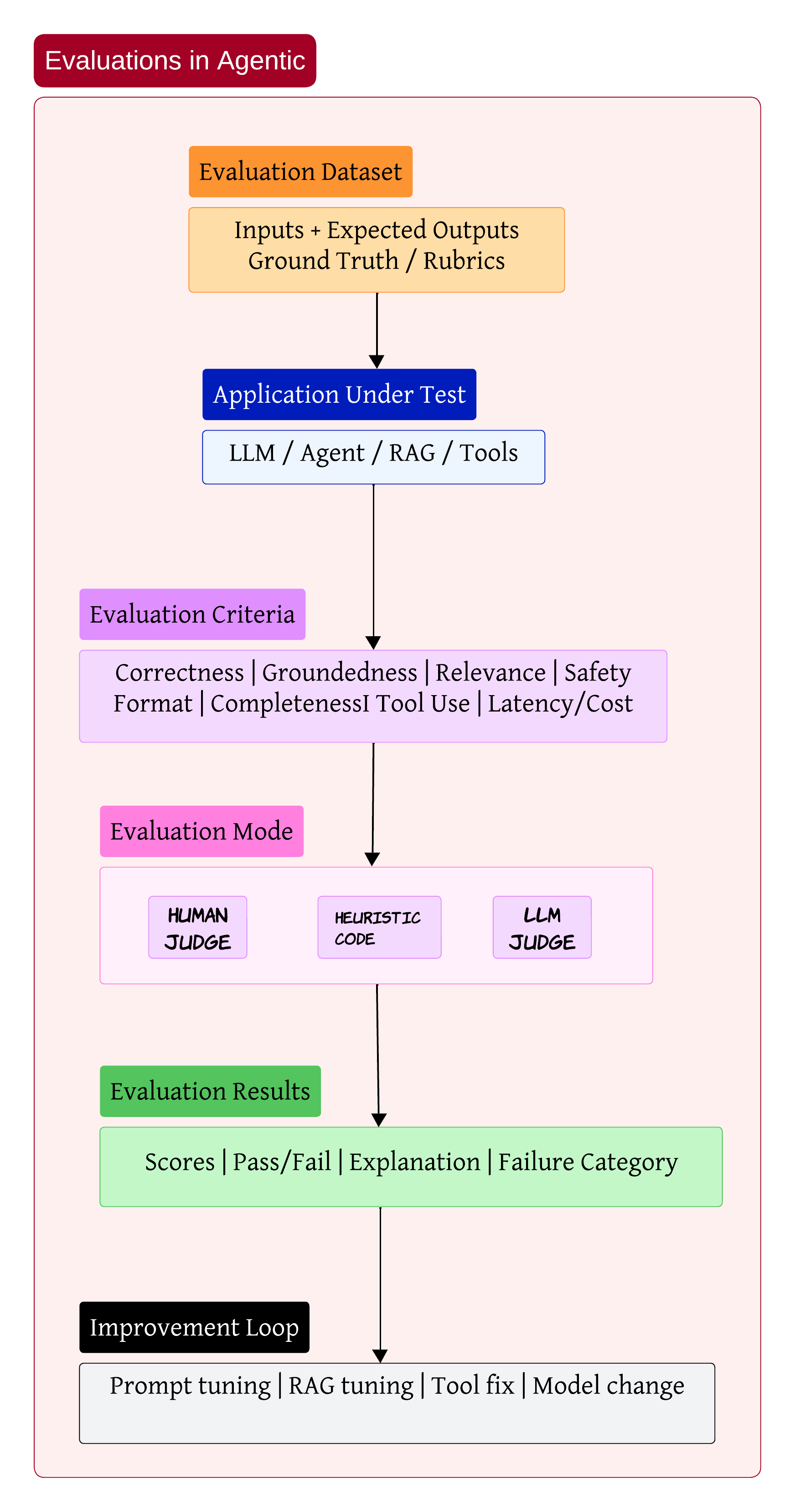
A proper evaluation setup usually starts with datasets containing: - user inputs - expected outputs - scoring rubrics
Then the application under test runs against those datasets
The evaluation itself can happen through: - humans - heuristics - LLM judges
The output should not just be a score. It should explain why the system failed and what category the failure belongs to
That feedback loop is where most of the real engineering work happens
Sometimes the issue is prompt quality. Sometimes retrieval is weak. Sometimes the wrong tool gets selected. And sometimes the model itself is simply not good enough for the task
My personal opinion
Evaluation pipelines are becoming more important than prompt engineering itself
Bringing Everything Together 🧩
After working on enough enterprise AI systems, the architecture starts looking less like a chatbot and more like a distributed operating system for intelligence
You have: - orchestration layers - retrieval systems - communication protocols - safety controls - evaluation pipelines
The LLM is obviously important. But honestly, it is only one piece of the overall system
The real engineering challenge is building everything around the model so the system remains: - reliable - observable - secure
That is where most of the hard work starts
I think that is where the next generation of AI engineering is heading 🚀