Skip to content

Architecture

Agentic AI Patterns

Over the last year Iโ€™ve been building and reviewing a lot of agentic AI systems. Some were internal copilots. Some were multi-agent workflows. Some looked amazing in demos and completely collapsed once real users started interacting with them ๐Ÿ˜„

After a while I noticed the same patterns showing up again and again

Not just prompt patterns. Actual architecture patterns

Things like:

  • how agents access tools ?
  • how agents communicate ?
  • where guardrails should sit ?
  • how evaluations should run ?
  • how memory should work ?

This post is basically a collection of notes and patterns that I keep coming back to while designing production-grade systems

I will say that it is not meant to be a perfect academic explanation. Think of it more like architecture notes from someone trying to make these systems survive production traffic, weird user behavior and enterprise security reviews ๐Ÿ˜„


High Level Agentic AI Architecture ๐Ÿ—๏ธ

When people first hear the term Agentic AI, they often imagine a chatbot with a few tools attached to it

In reality, once you start building enterprise systems, the architecture becomes much bigger very quickly

The diagram below is roughly how I think about a modern enterprise agentic AI stack today
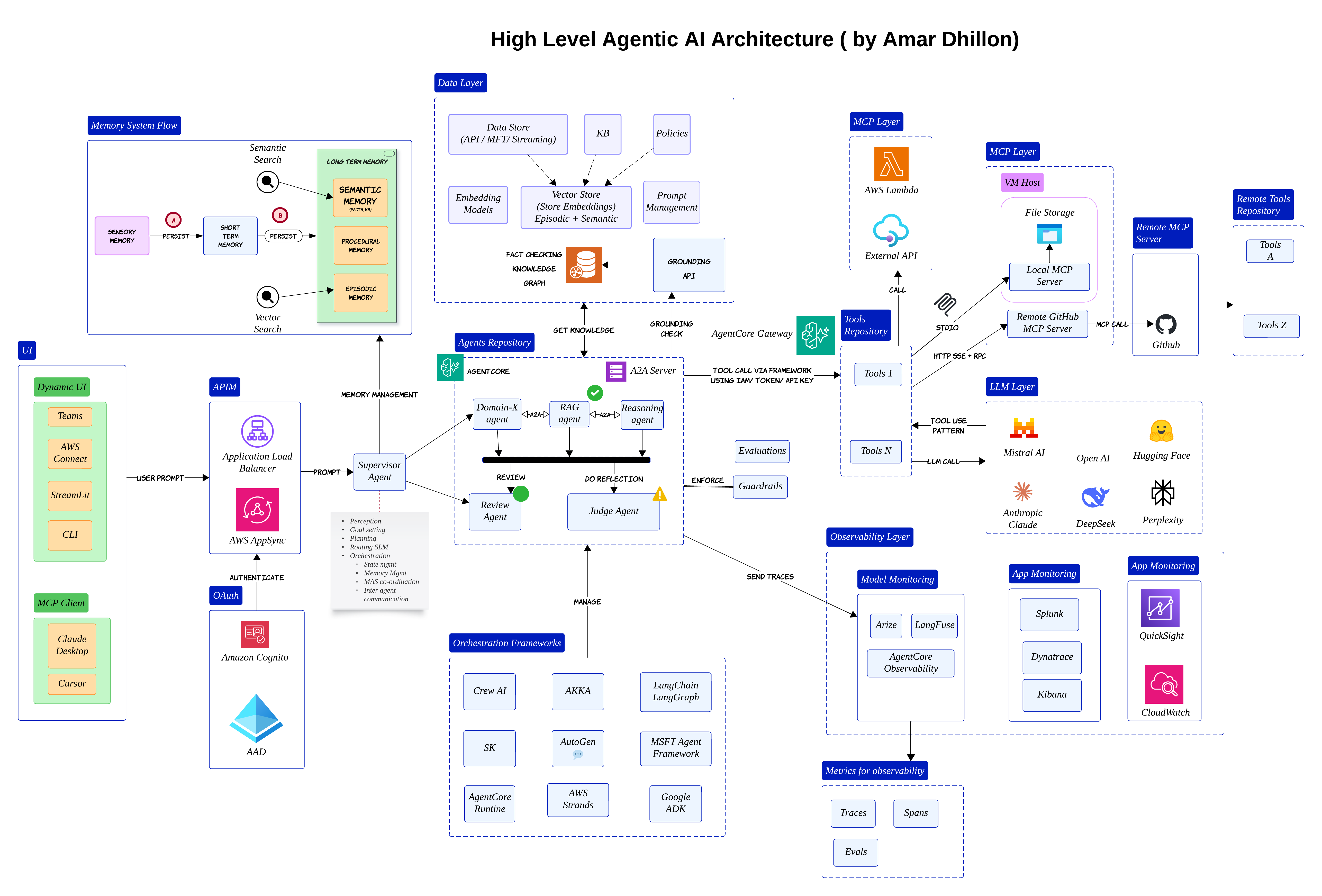
At the center, you still have LLMs and agents. But around them, there are many supporting layers:

  • Orchestration
  • Memory
  • Tools
  • Evaluations
  • Observability

The user may come from Teams, Streamlit, a web app or even another MCP client. The request usually lands behind an API gateway and then reaches some kind of supervisor or orchestrator

That orchestrator becomes the brain of the system. It decides whether the request should go to a RAG agent, a reasoning agent or perhaps a review agent

Important shift

Most enterprise AI systems are no longer "single chatbot" systems. They are slowly becoming distributed AI workflows with multiple cooperating components

One thing I learned pretty early is that orchestration becomes more important than the prompt itself. A great model with weak orchestration still behaves badly in production


Why MCP Matters ๐Ÿ”Œ

Once the orchestrator starts delegating work, another problem appears very quickly

How does the agent safely interact with external systems?

Most teams initially hardcode integrations directly into orchestration logic. That works for demos. It becomes painful very quickly once you have dozens of tools and APIs

That is where MCP starts becoming useful
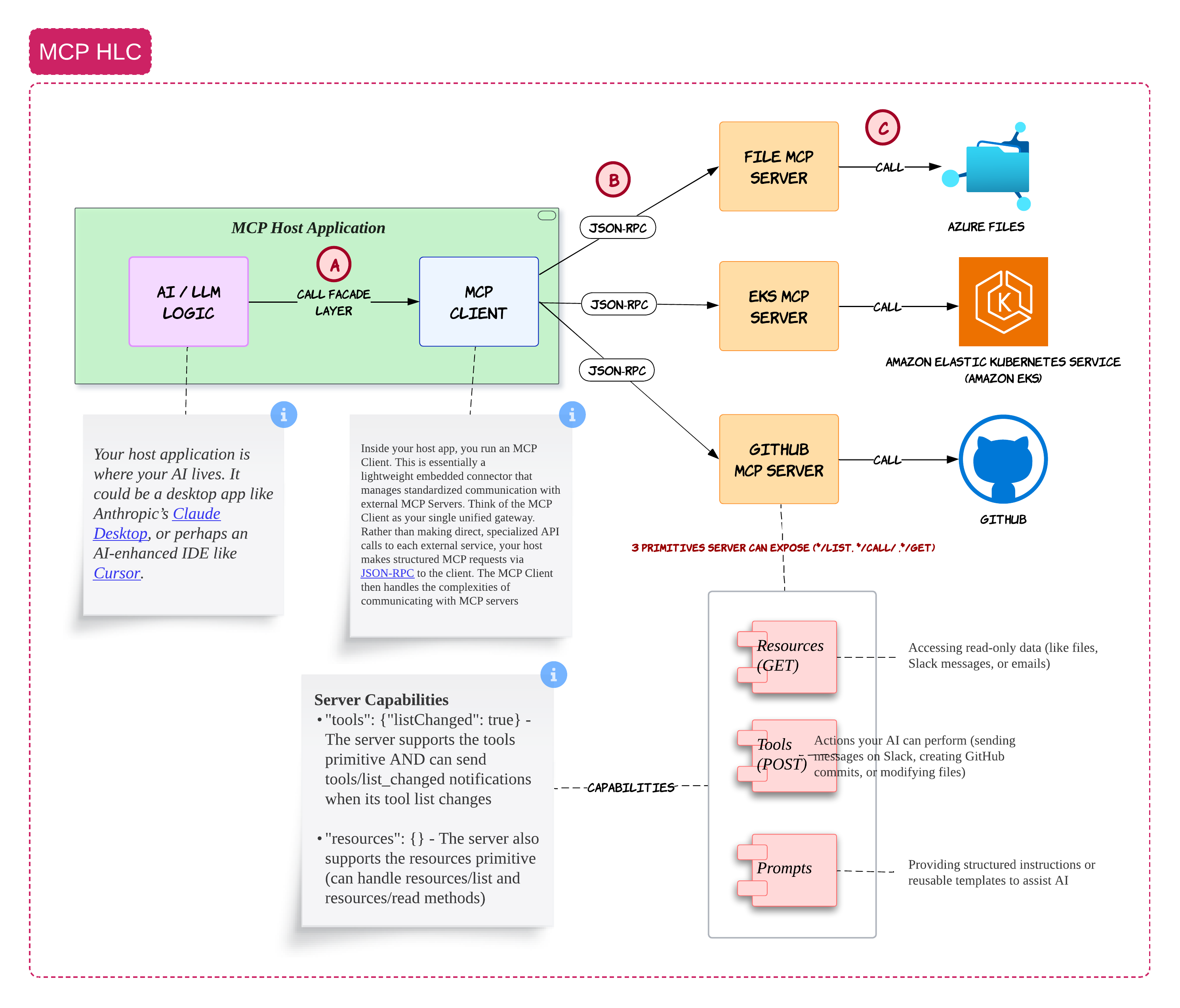
The way I think about MCP is pretty simple

The host application contains your AI logic. This could be something like Claude Desktop, Cursor or your own internal AI portal

Inside the host application, you run an MCP client. That MCP client becomes the standardized bridge between your AI system and external services

Those external services are exposed through MCP servers

For example:

  • a GitHub MCP server
  • a file MCP server
  • an EKS MCP server

Instead of the LLM directly talking to everything in your enterprise, it goes through a controlled layer

That controlled layer becomes extremely important because now you can apply:

  • permissions
  • logging
  • policy checks

Why this matters

In enterprise environments, the hardest problem is usually not model intelligence.
It is controlled and auditable access to enterprise systems


MCP Starts Looking Like a Tool Operating System ๐Ÿงฐ

After building a few systems with MCP, I slowly stopped thinking about it as just a protocol

It started feeling more like a lightweight operating system for tools

The agent handles reasoning. MCP handles capabilities

The agent might decide:

"I need to fetch a Kubernetes deployment"

Or:

"I need to update a GitHub issue"

But the actual execution happens through MCP servers

This separation becomes very useful because your reasoning layer and tool layer evolve independently

Common mistake

Many teams expose overly powerful tools directly to agents.
Start with narrow scoped tools first and slowly expand capabilities


A2A: Agents Talking to Other Agents ๐Ÿค

Once agents become more specialized, another challenge appears

How do agents collaborate with each other?

This is where A2A becomes interesting
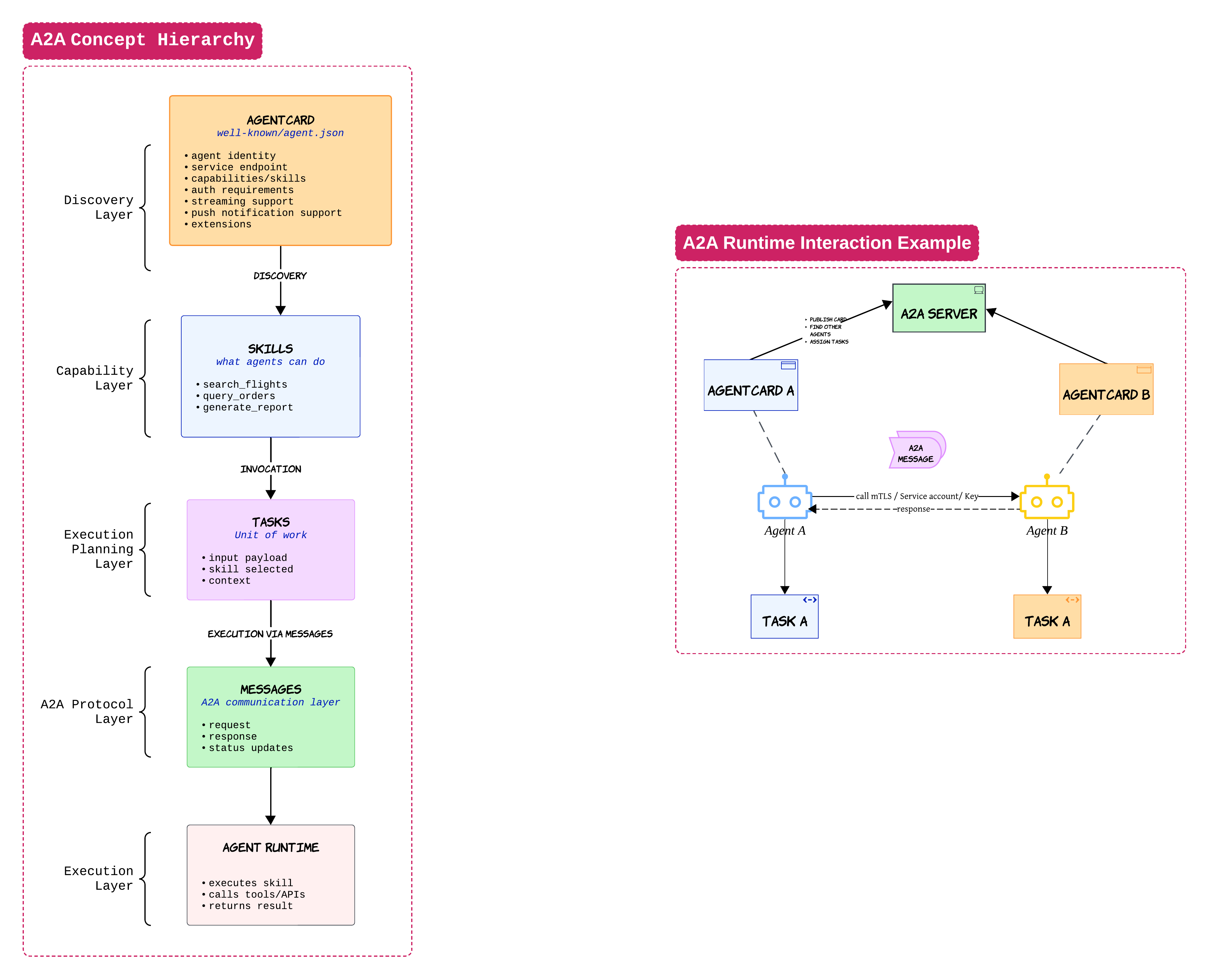
When I first looked at A2A, I thought it was competing with MCP. After building a few systems, I realized they solve completely different problems

MCP is mostly about agents talking to tools

A2A is about agents talking to other agents

An agent card is one of the most important concepts here. Think of it like a public profile for an agent

It tells other agents:

  • what the agent can do
  • where it lives
  • how to authenticate

Once another agent discovers this information, it can delegate work using tasks and messages

A travel agent may ask a hotel agent to handle accommodations. That hotel agent may then call tools through MCP

This is why MCP and A2A usually end up existing together inside larger systems

Practical advice

Start with a single orchestrator first.
Multi-agent collaboration sounds exciting but debugging distributed reasoning flows can become chaotic very quickly ๐Ÿ˜„


RAG Is Still One of the Most Useful Patterns ๐Ÿ“š

Even with all the excitement around agents, RAG is still one of the most practical patterns in enterprise AI

But there is a lot of confusion around what RAG actually solves

RAG is not memory
RAG is not orchestration
RAG is mostly retrieval + grounding
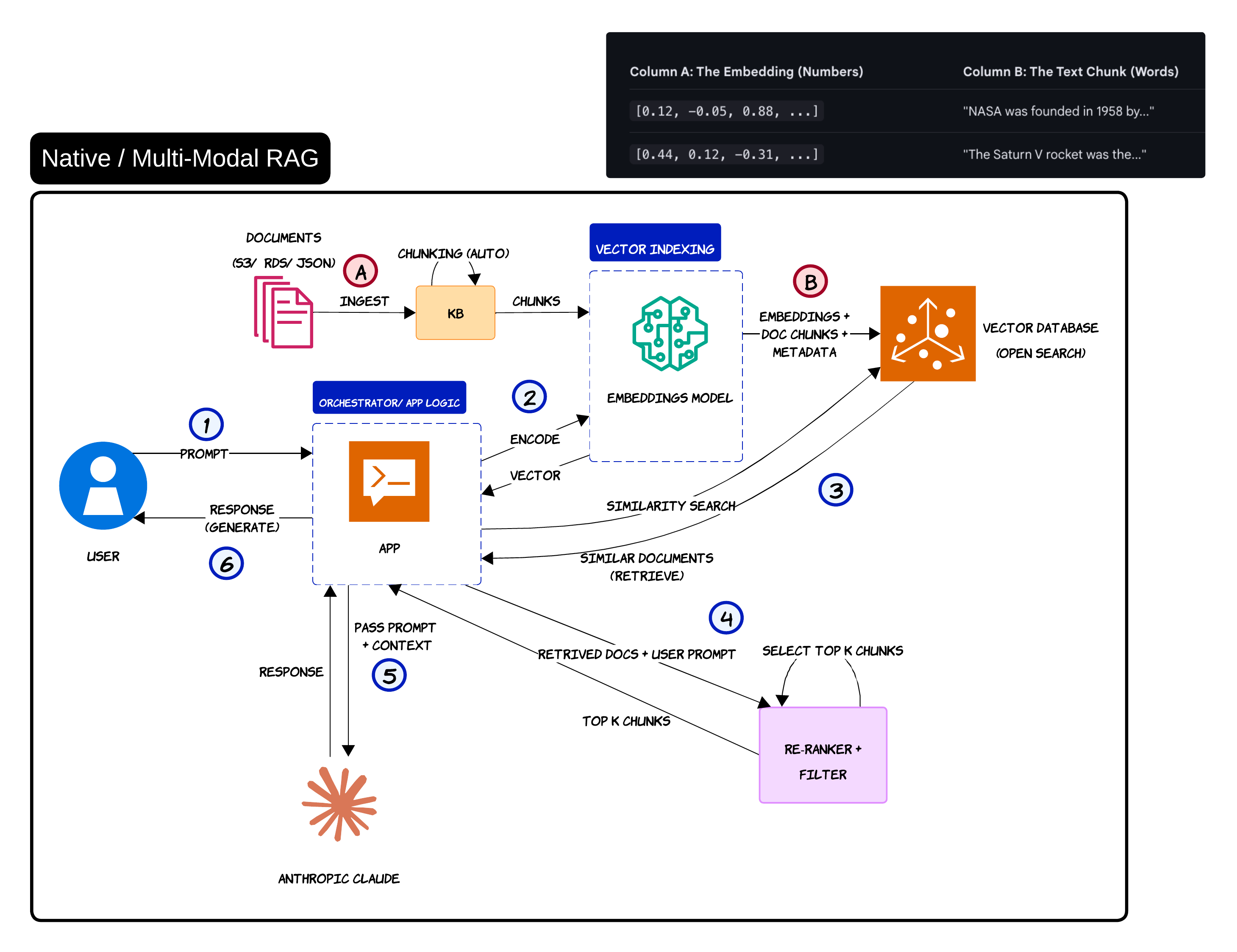
The basic flow is straightforward

Documents are ingested, chunked, embedded and stored inside a vector database

When the user asks a question, the query gets converted into embeddings. The system retrieves the most similar chunks and injects them into the LLM prompt

That grounding step is what helps reduce hallucinations

A lot of teams underestimate how far simple RAG can take them. To be honest, many systems do not need complicated memory architectures on day one

Common misconception

Many people treat RAG as memory.
RAG retrieves information. Memory usually evolves over time and becomes stateful


Graph RAG and Multi-Modal Retrieval ๐Ÿ•ธ๏ธ

Simple vector retrieval works well for many use cases. But eventually you run into situations where semantic similarity alone is not enough

That is where Graph RAG becomes interesting
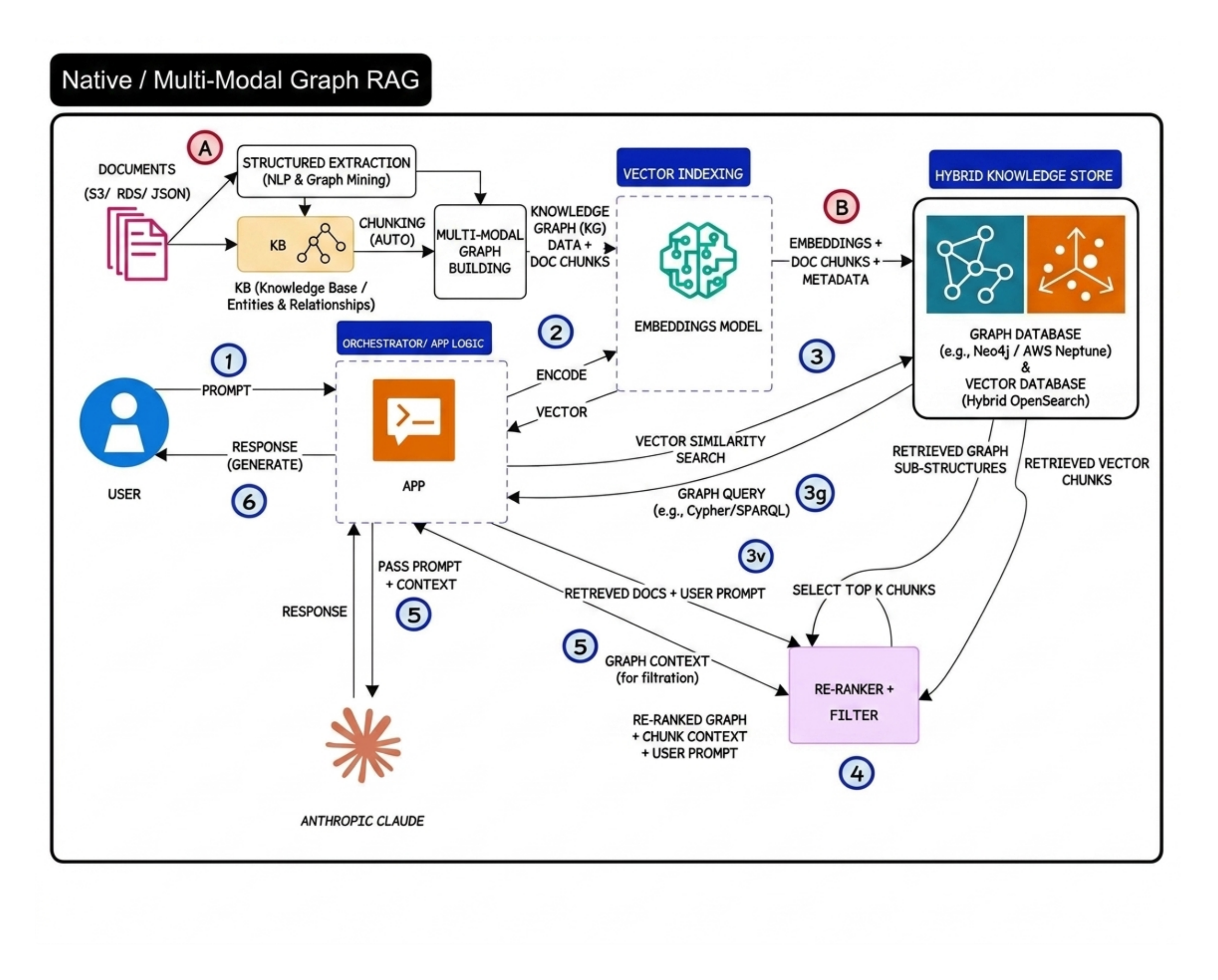
The big idea behind Graph RAG is relationship awareness

Instead of only retrieving similar chunks, the system also understands how entities connect with each other

A good example is airline disruption management

A vector database may retrieve compensation policy chunks. But a graph-aware system can additionally reason over relationships between:

  • customer tier
  • disruption type
  • route history

That extra relationship context becomes extremely valuable in reasoning-heavy workflows

Reality check

Graph RAG is powerful but it also increases operational complexity significantly.
Most teams should start with simple vector RAG first


Prompt Engineering vs RAG vs Fine-Tuning ๐Ÿงช

This is probably one of the most misunderstood topics in GenAI right now

People often use these terms interchangeably even though they solve very different problems
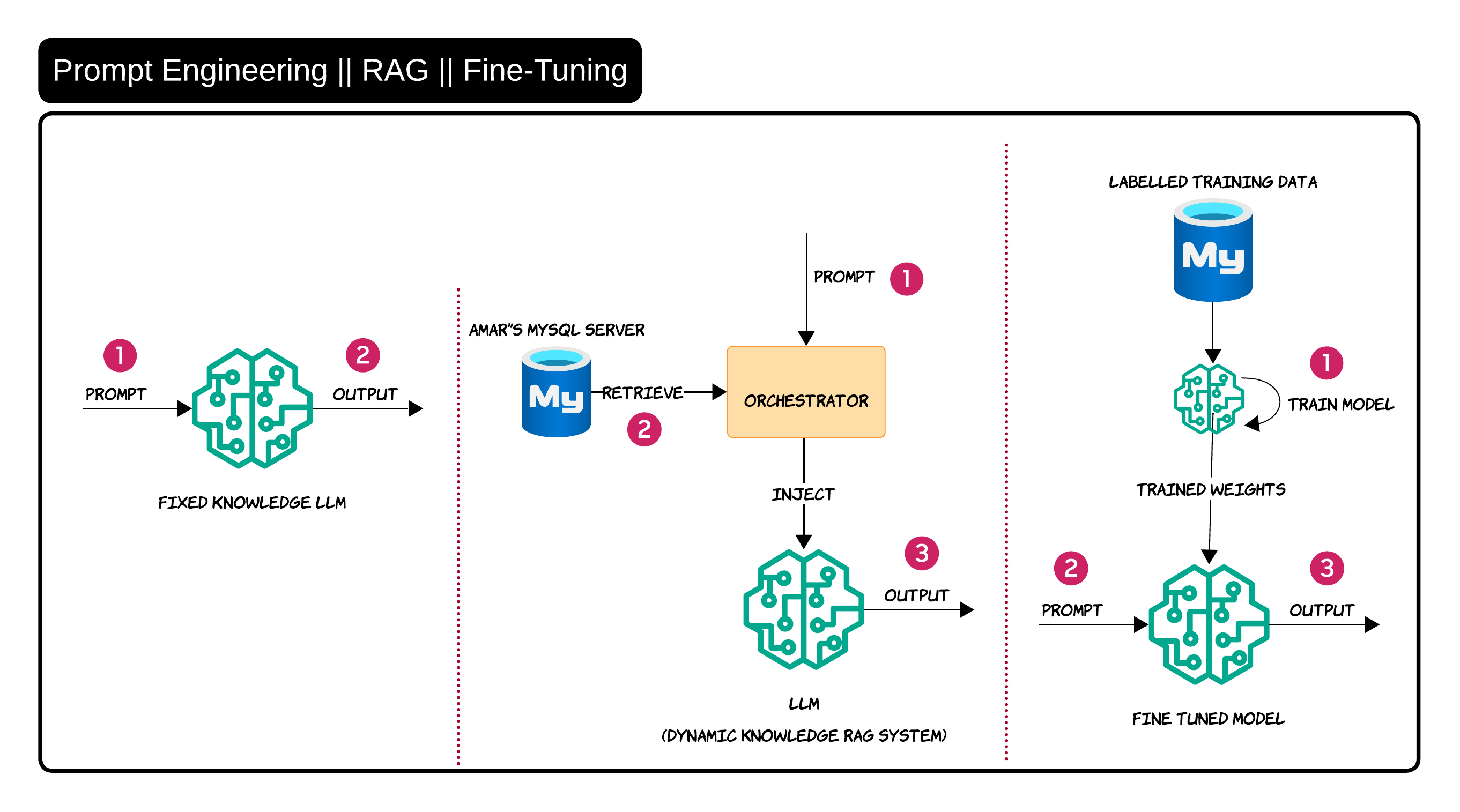
Prompt engineering is mainly about improving instructions

RAG is about injecting external knowledge dynamically

Fine-tuning is about changing model behavior through training data

I usually explain it like this:

  • If the model needs better guidance โ†’ prompt engineering
  • If the model needs enterprise knowledge โ†’ RAG
  • If the model needs behavioral adaptation โ†’ fine-tuning

In real enterprise systems, RAG is usually the first practical step because enterprise knowledge changes constantly. Nobody wants to retrain a model every time a policy document changes ๐Ÿ˜„


Guardrails Need Multiple Layers ๐Ÿ›ก๏ธ

One thing that becomes obvious very quickly in production is that a single moderation layer is not enough

Guardrails need to exist throughout the entire workflow
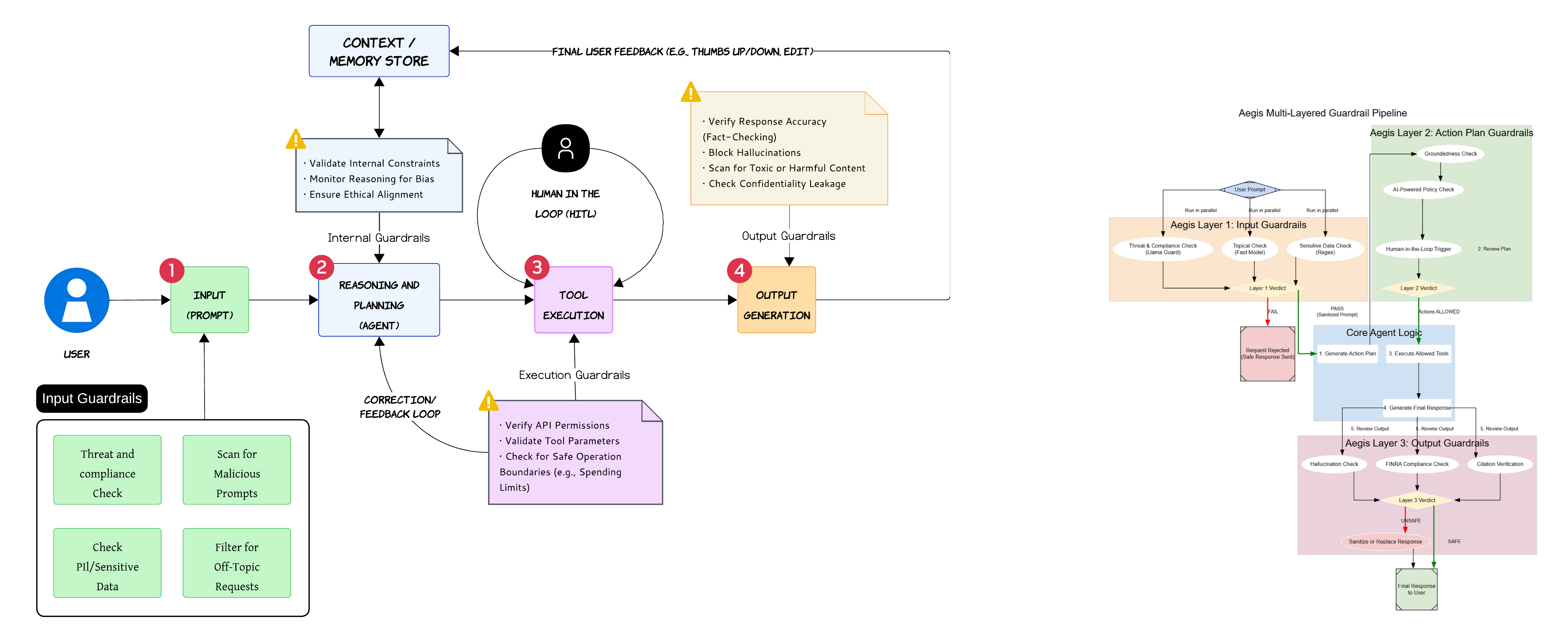
Input guardrails help filter malicious prompts and sensitive data before the request reaches the agent

Internal guardrails monitor reasoning quality and policy alignment while the agent is thinking

Execution guardrails validate tool permissions and parameter safety before actions happen

Output guardrails validate hallucinations, confidentiality leakage and harmful responses before anything reaches the user

Important

Most dangerous failures happen during tool execution and not during text generation

One of the biggest mistakes teams make is focusing entirely on output filtering while ignoring execution safety


Agent Mesh Defense with Gateways and Sidecars ๐Ÿงฑ

As systems become more distributed, service mesh style thinking starts becoming useful for agents too
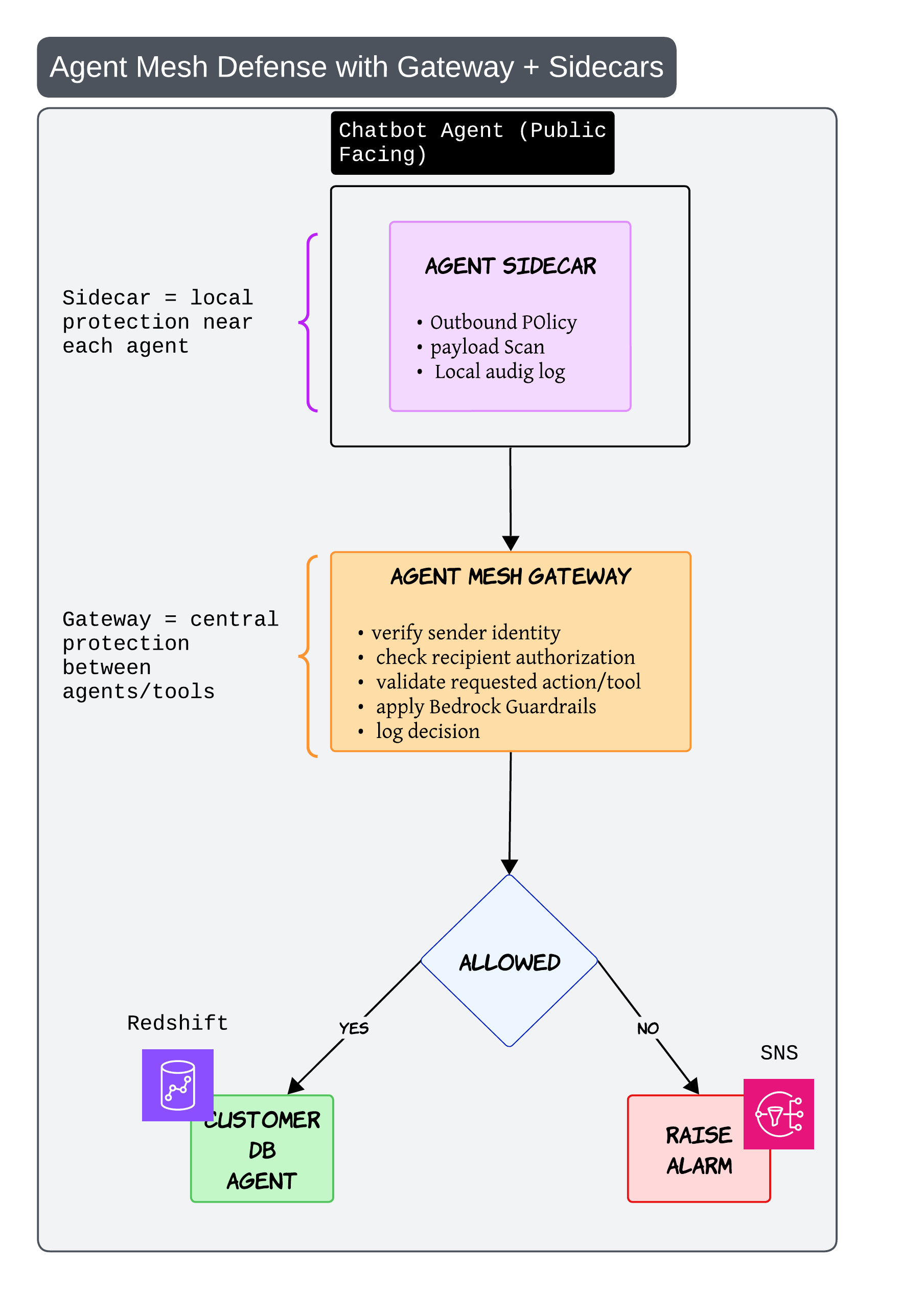
The sidecar acts like local protection near each agent

It can: - inspect payloads - enforce outbound policy - maintain local audit logs

The gateway acts like centralized protection between agents and tools

It verifies: - sender identity - requested action - authorization

This becomes especially important once multiple agents start calling each other dynamically

Without this kind of architecture, one badly behaving agent can create problems across the entire system very quickly


Sandboxing and Least Privilege ๐Ÿงฏ

This pattern sounds boring in diagrams but becomes incredibly important in production

Especially once agents start generating code or executing actions
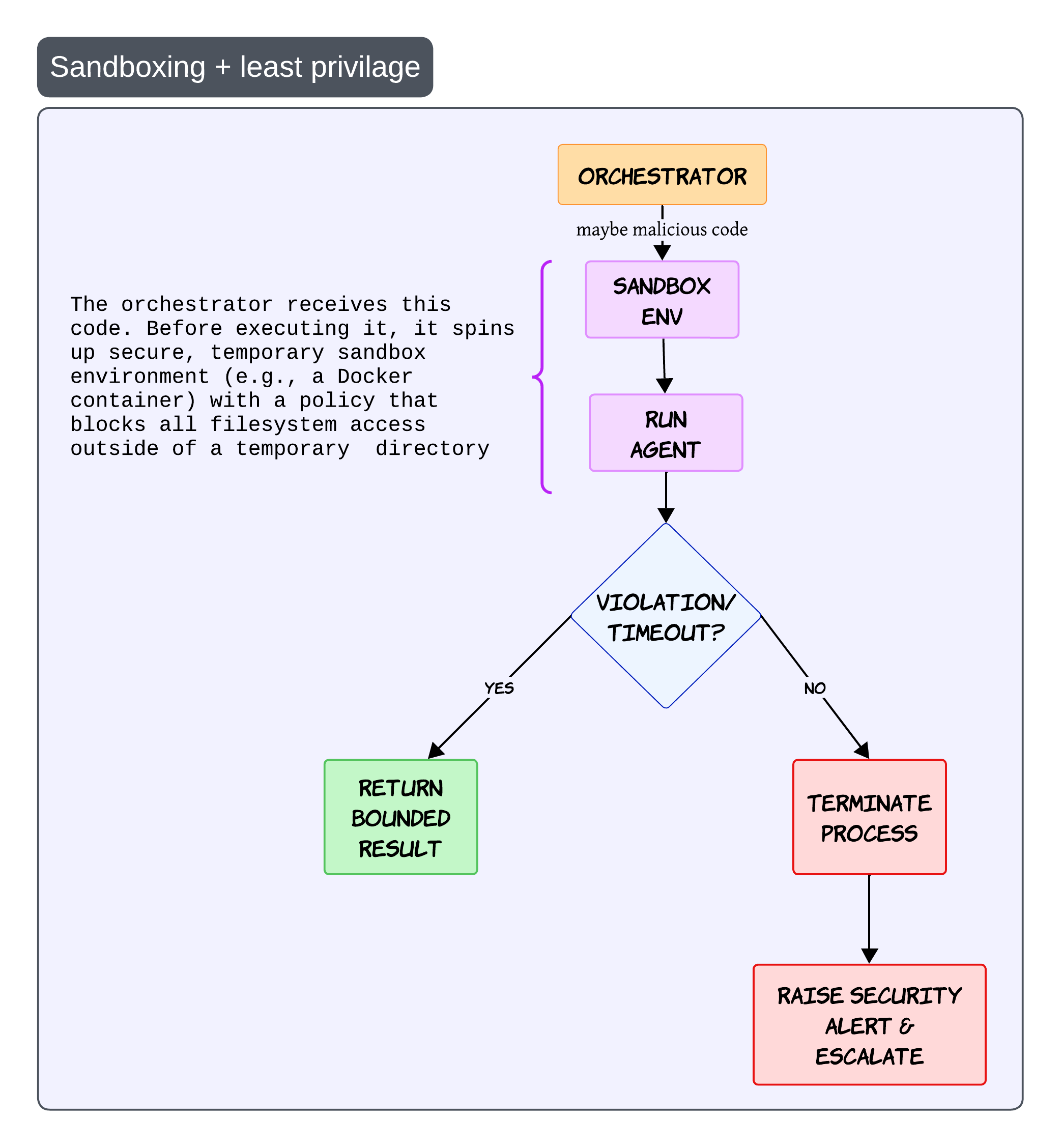
The idea is simple

Before running risky operations, create a temporary isolated execution environment

This could be: - Docker containers - microVMs - isolated runtimes

The sandbox should have strict policies with minimal filesystem access and tightly scoped permissions

If the execution violates policy or exceeds limits, terminate the process immediately and raise an alert

Never trust generated code blindly

Even if the generated code looks harmless, always assume the execution path can become unsafe


Fallback Model Invocation for Reliability ๐Ÿ”

Sooner or later every model provider fails ๐Ÿ˜„

There will be: - outages - invalid outputs - latency spikes

That is why fallback strategies become important
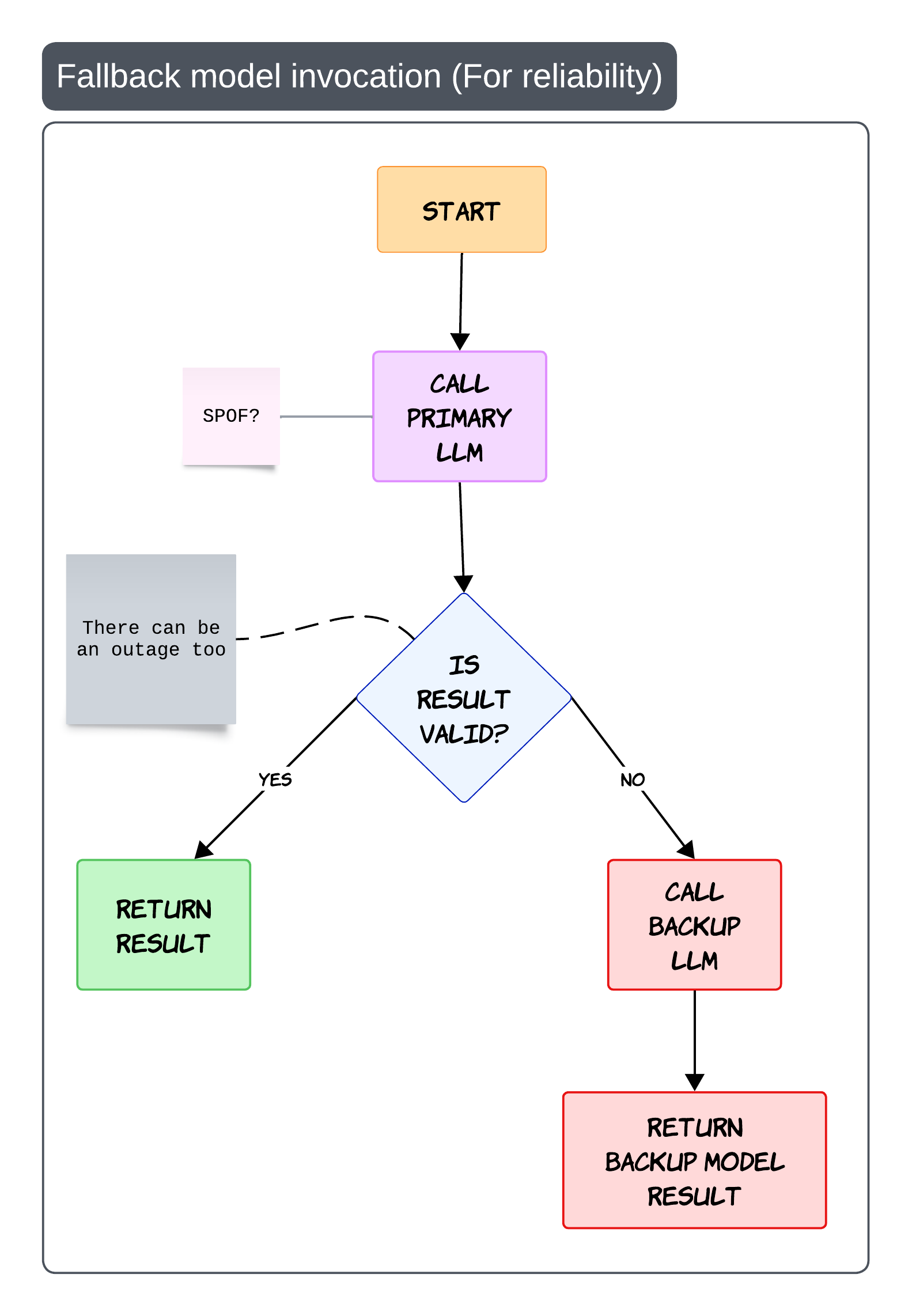
The simplest flow is: - call the primary model - validate the output - fallback if needed

The important part is validation

Fallback should not only trigger on API failure. It can also trigger when: - schema validation fails - grounding fails - safety checks fail

This prevents your entire platform from becoming dependent on a single provider

Practical production advice

Keep backup prompts optimized separately.
Different models often behave very differently with the same prompt


Evaluations Are the Real Engineering Loop ๐Ÿ“Š

One thing Iโ€™ve learned while building GenAI systems is this:

Most teams spend too much time building and not enough time evaluating

Without evaluations, improvement becomes guesswork
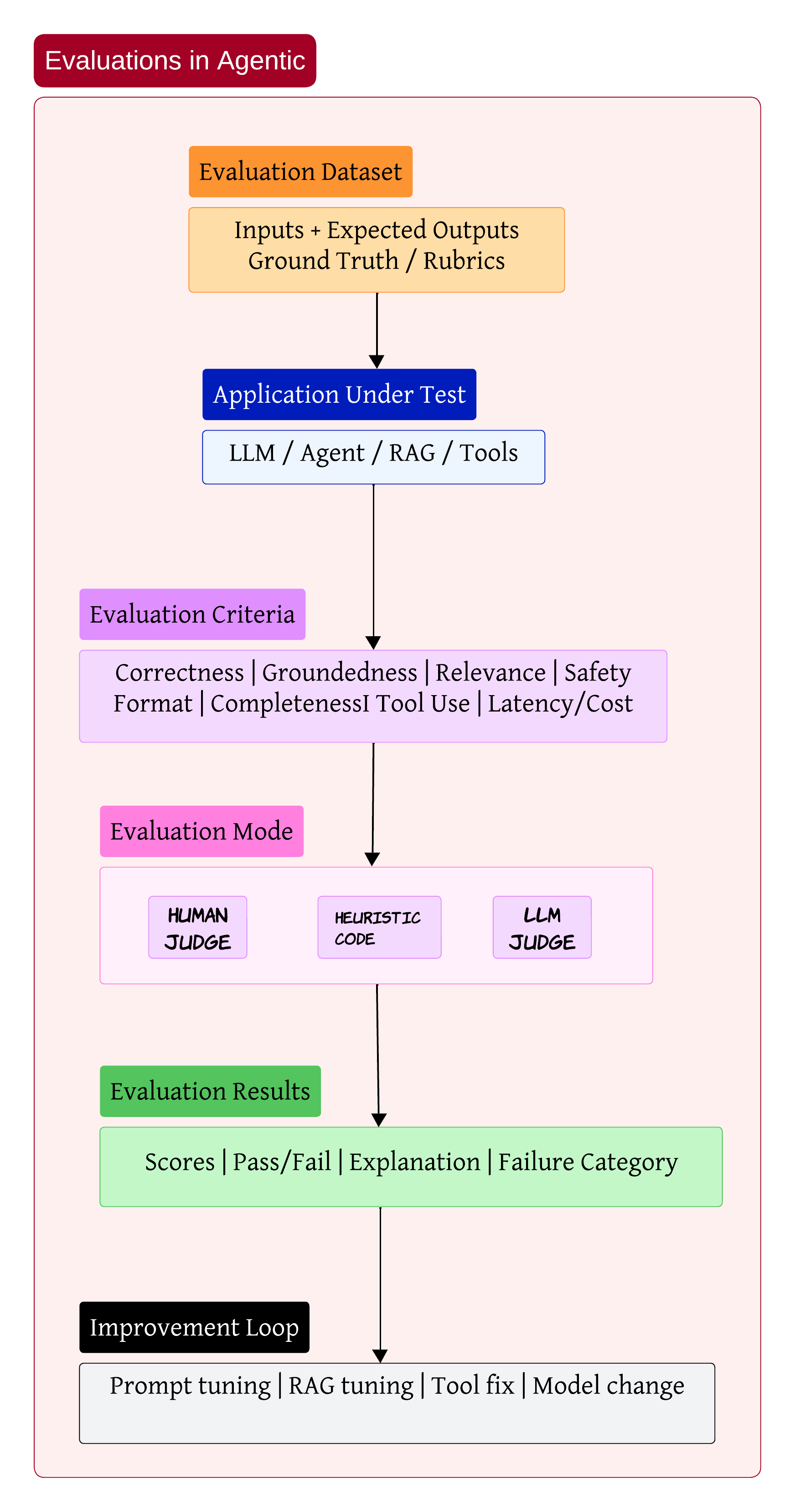
A proper evaluation setup usually starts with datasets containing: - user inputs - expected outputs - scoring rubrics

Then the application under test runs against those datasets

The evaluation itself can happen through: - humans - heuristics - LLM judges

The output should not just be a score. It should explain why the system failed and what category the failure belongs to

That feedback loop is where most of the real engineering work happens

Sometimes the issue is prompt quality. Sometimes retrieval is weak. Sometimes the wrong tool gets selected. And sometimes the model itself is simply not good enough for the task

My personal opinion

Evaluation pipelines are becoming more important than prompt engineering itself


Bringing Everything Together ๐Ÿงฉ

After working on enough enterprise AI systems, the architecture starts looking less like a chatbot and more like a distributed operating system for intelligence

You have: - orchestration layers - retrieval systems - communication protocols - safety controls - evaluation pipelines

The LLM is obviously important. But honestly, it is only one piece of the overall system

The real engineering challenge is building everything around the model so the system remains: - reliable - observable - secure

That is where most of the hard work starts

I think that is where the next generation of AI engineering is heading ๐Ÿš€

6R's of Cloud Migration ๐Ÿงญ

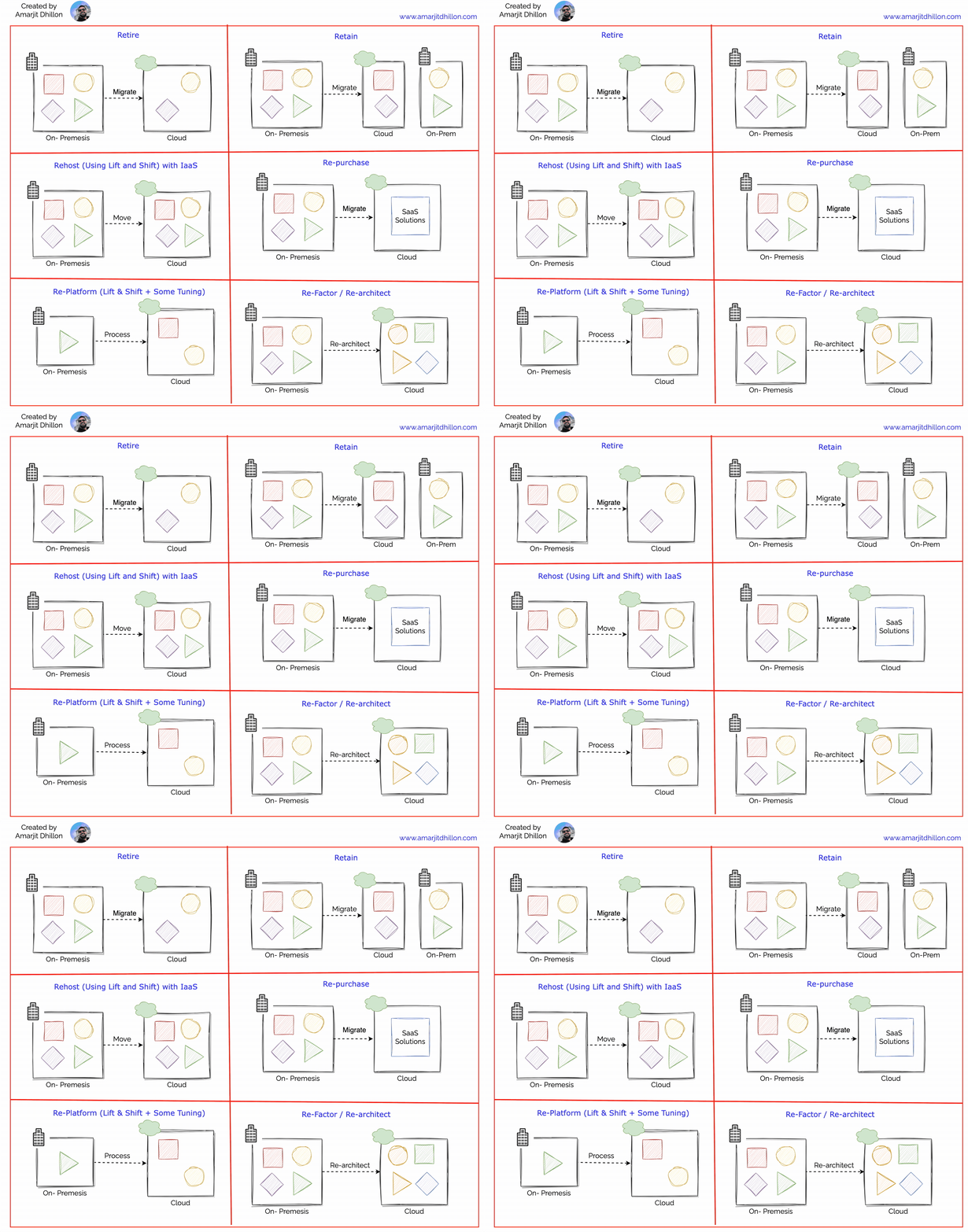
Here are the 6 R's of cloud migration

6R's

Retire ๐Ÿ‘ด

Decommissioning of the unnecessary workloads

Retaining ๐Ÿ“

Donโ€™t move something to the cloud while move some pieces

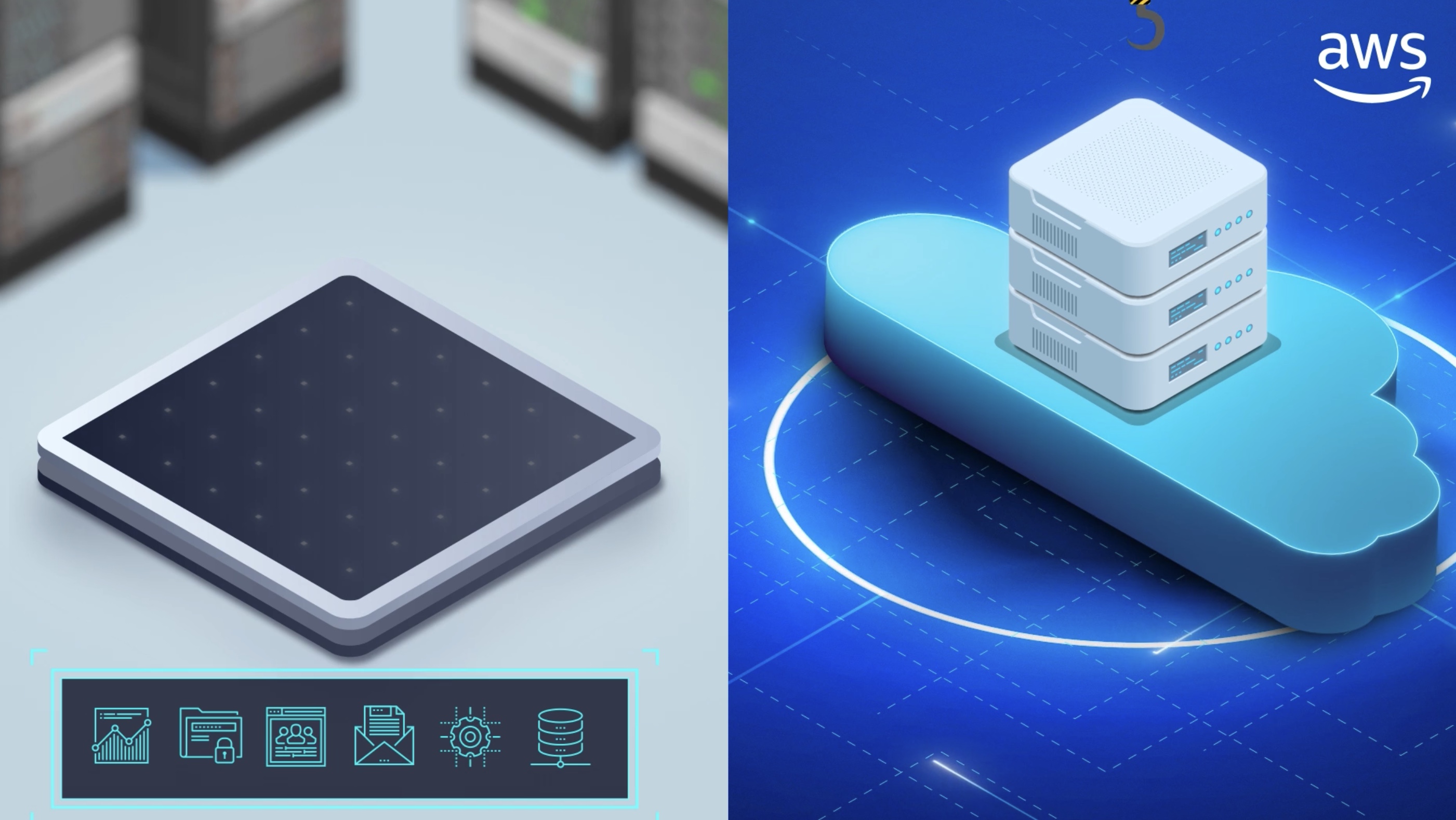
Rehost (lift and shift using IaaS) ๐Ÿš๏ธ

No re-factoring or code changes needed

Migrate your applications first using the rehosting approach ("lift-and-shift"). With rehosting, you move an existing application to the cloud as-is and modernize it later.

Re-host example

Rehosting has four major benefits:

  • Immediate sustainability: The lift-and-shift approach is the fastest way to reduce your data center footprint.
  • Immediate cost savings: Using comparable cloud solutions will let you trade capital expenses with operational expenses. Pay-as-you-go and only pay for what you use.
  • IaaS solutions: IaaS virtual machines (VMs) provide immediate compatibility with existing on-premises applications. Migrate your workloads to Azure Virtual Machines and modernize while in the cloud. Some on-premises applications can move to an application platform with minimal effort. We recommend Azure App Service as a first option with IaaS solutions able to host all applications.
  • Immediate cloud-readiness test: Test your migration to ensure your organization has the people and processes in place to adopt the cloud. Migrating a minimum viable product is a great approach to test the cloud readiness of your organization.

Re-purchasing (SaaS) ๐Ÿ’ฐ

To buy SaaS alternatives.Most organizations replace about 15% of their applications with software-as-a-service (SaaS) and low-code solutions. They see the value in moving "from" technologies with management overhead ("control") and moving "to" solutions that let them focus on achieving their objectives ("productivity").

Re-purchase example

Re-platforming (PaaS) ๐Ÿ“ฆ

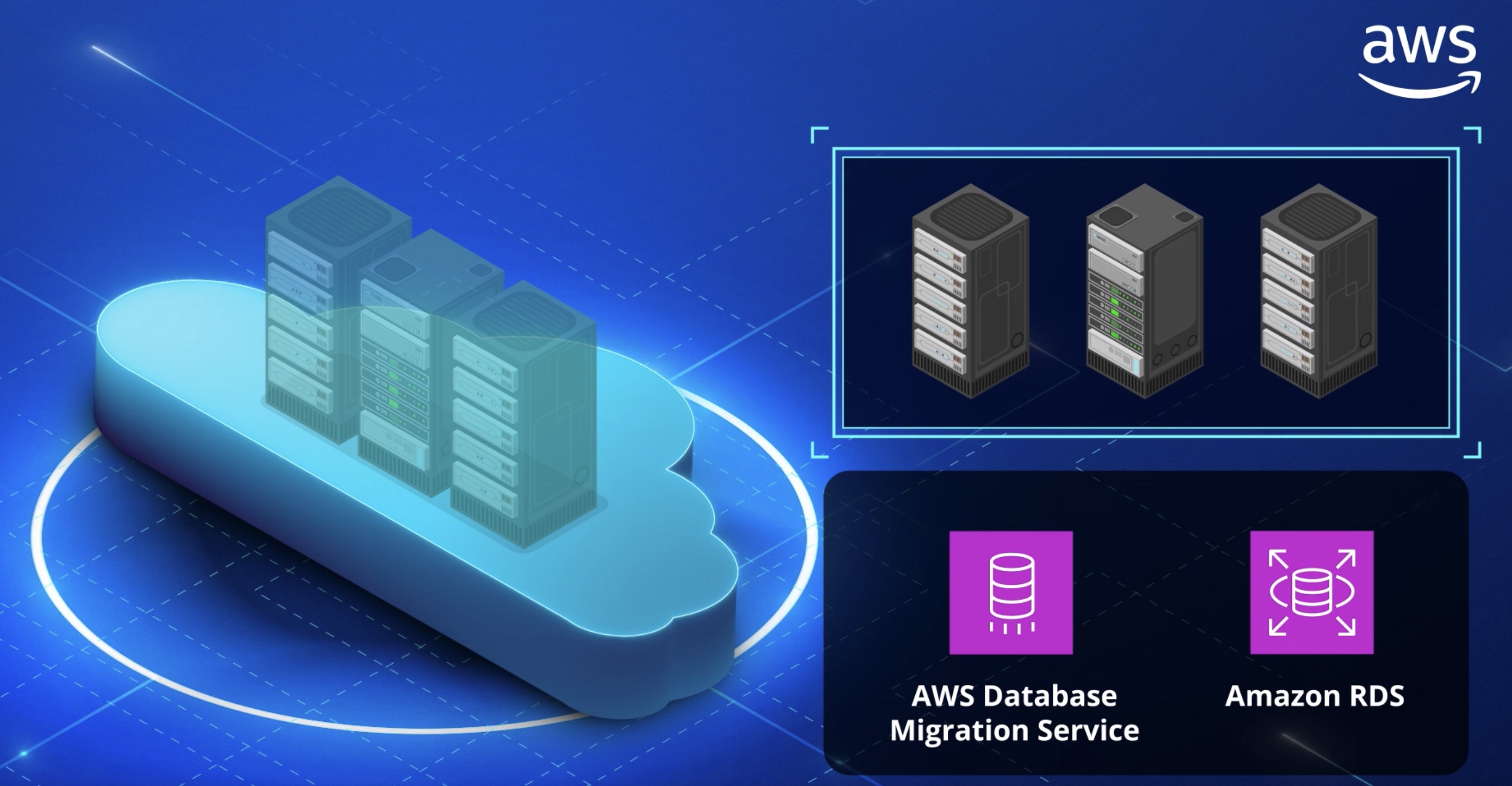
It means lift and shift + some tuning. Replatforming, also known as โ€œlift, tinker, and shift,โ€ involves making a few cloud optimizations to realize a tangible benefit. Optimization is achieved without changing the core architecture of the application.

Re-platform example

Modernize or re-platform your applications first. In this approach, you change parts of an application during the migration process.

Refactoring ๐Ÿญ

Rebuilding the apps from scratch. it's very expensive but being able to use all max benefits of the cloud

Re-factor example

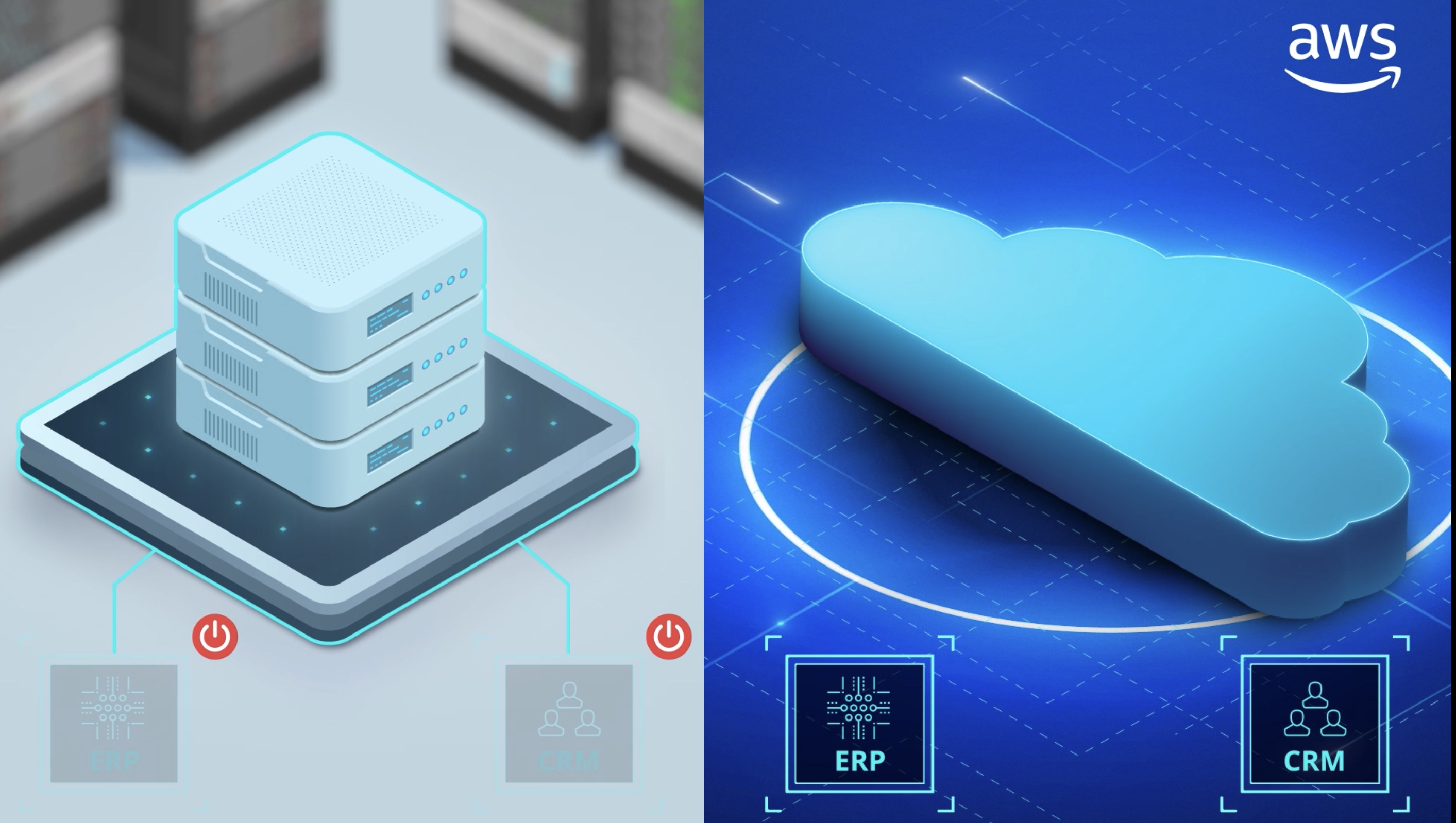
Retire

We recommend retiring any workloads your organization doesn't need. You'll need to do some discovery and inventory to find applications and environments that aren't worth the investment to keep. The goal of retiring is to be cost and time efficient. Shrinking your portfolio before you move to the cloud allows your team to focus on the most important assets.

Retire example

AWS Migration Evaluator ๐Ÿค”

Migration Evaluator

Migration Hub ๐Ÿ›๏ธ

Migration Evaluator

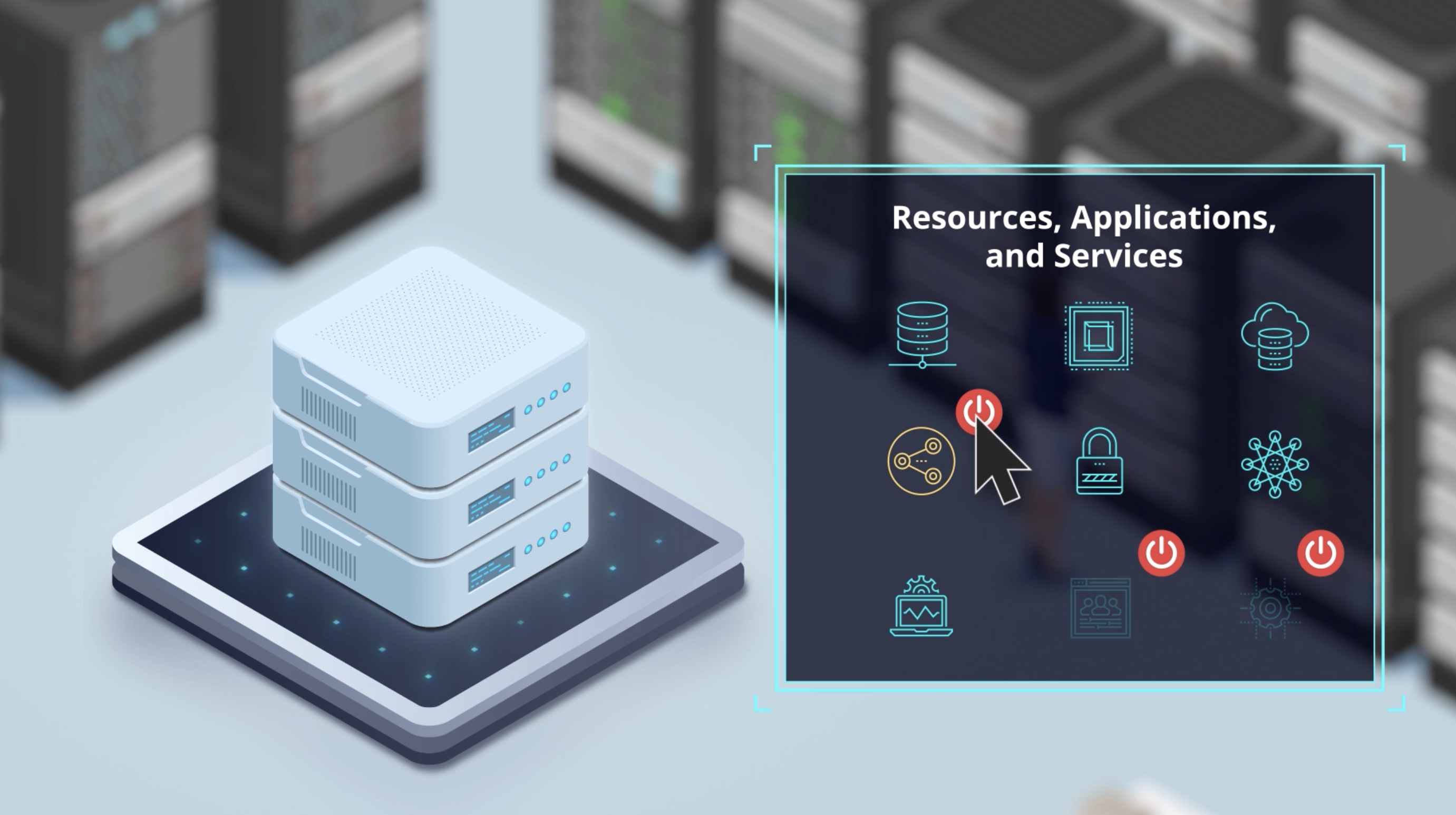
AWS Migration Hub provides a single place to discover your existing servers, plan migrations, and track the status of each application migration. Before migrating you can discover information about your on-premises server and application resources to help you build a business case for migrating or to build a migration plan.

Discovering your servers first is an optional starting point for migrations, gathering detailed server information, and then grouping the discovered servers into applications to be migrated and tracked. Migration Hub also gives you the choice to start migrating right away and to group servers during migration.

Partners get exclusive tools ๐Ÿ–ฅ๏ธ

Using Migration Hub allows you to choose the AWS and partner migration tools that best fit your needs, while providing visibility into the status of migrations across your application portfolio.

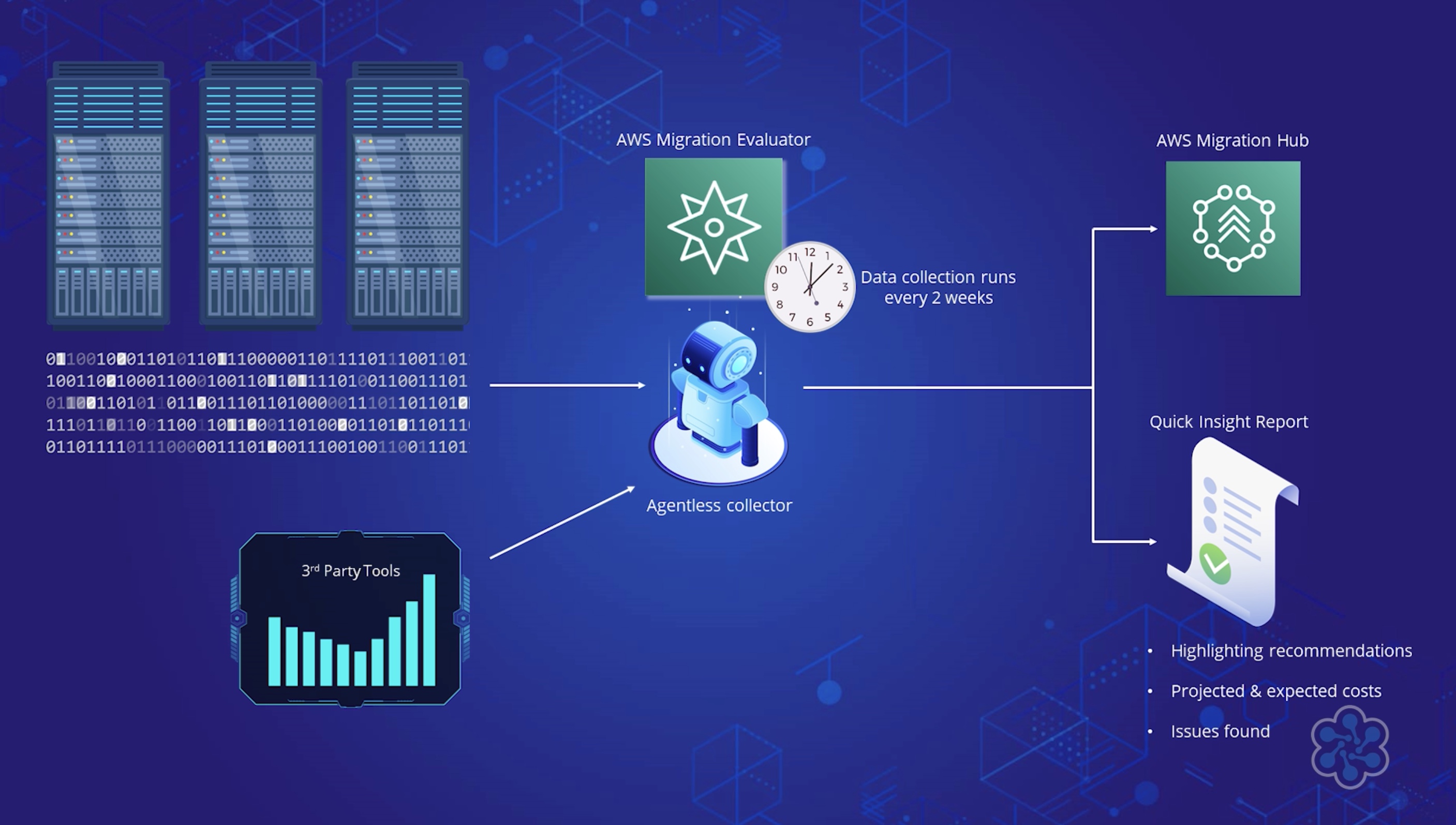
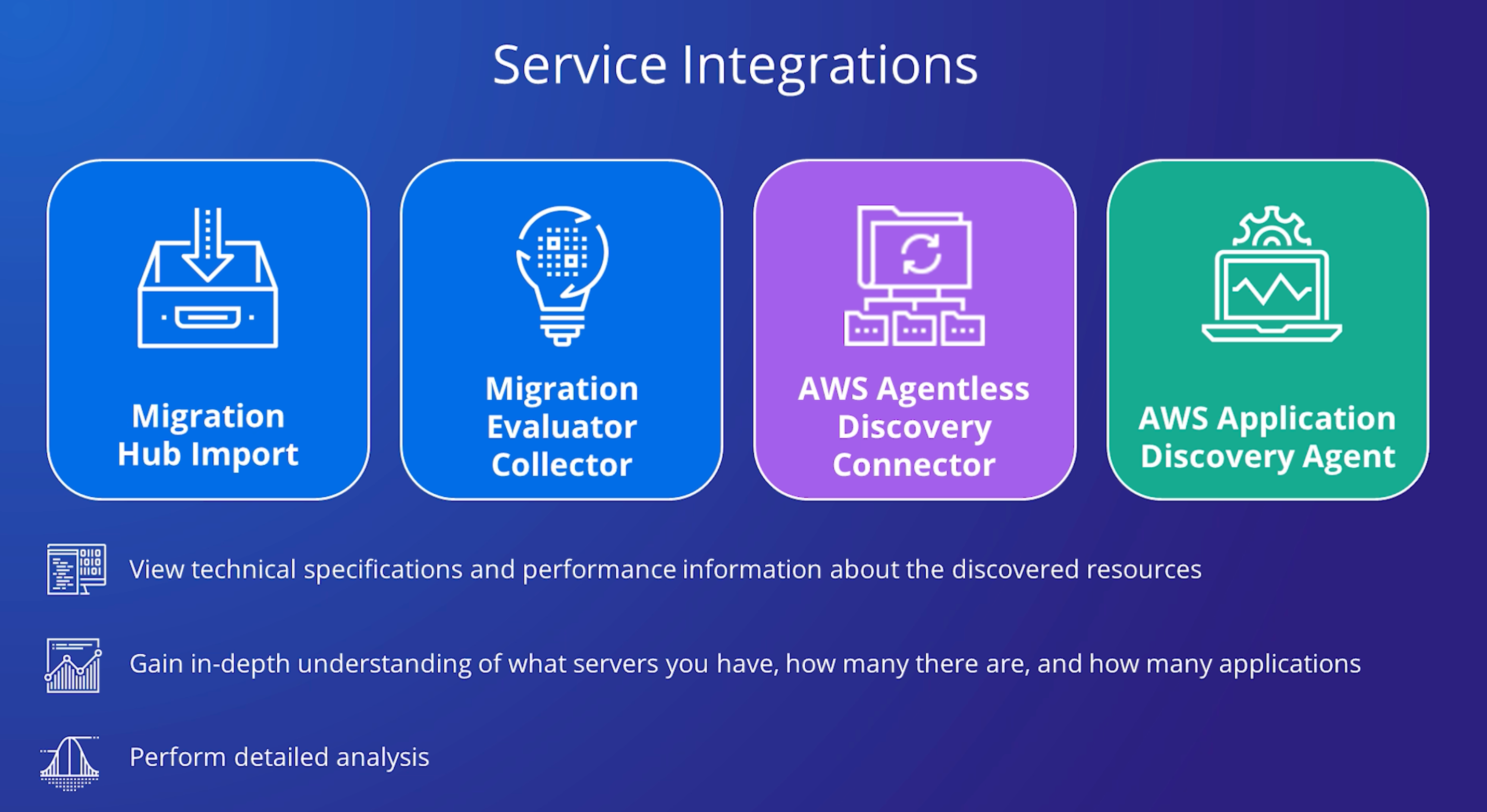
You get the data about your servers and applications into the AWS Migration Hub console by using the following discovery tools.

  • Application Discovery Service Agentless Collector โ€“ Agentless Collector is an on-premises application that collects information through agentless methods about your on-premises environment, including server profile information (for example, OS, number of CPUs, amount of RAM), database metadata (for example, version, edition, numbers of tables and schemas), and server utilization metrics.

Agentless

You install the Agentless Collector as a virtual machine (VM) in your VMware vCenter Server environment using an Open Virtualization Archive (OVA) file.

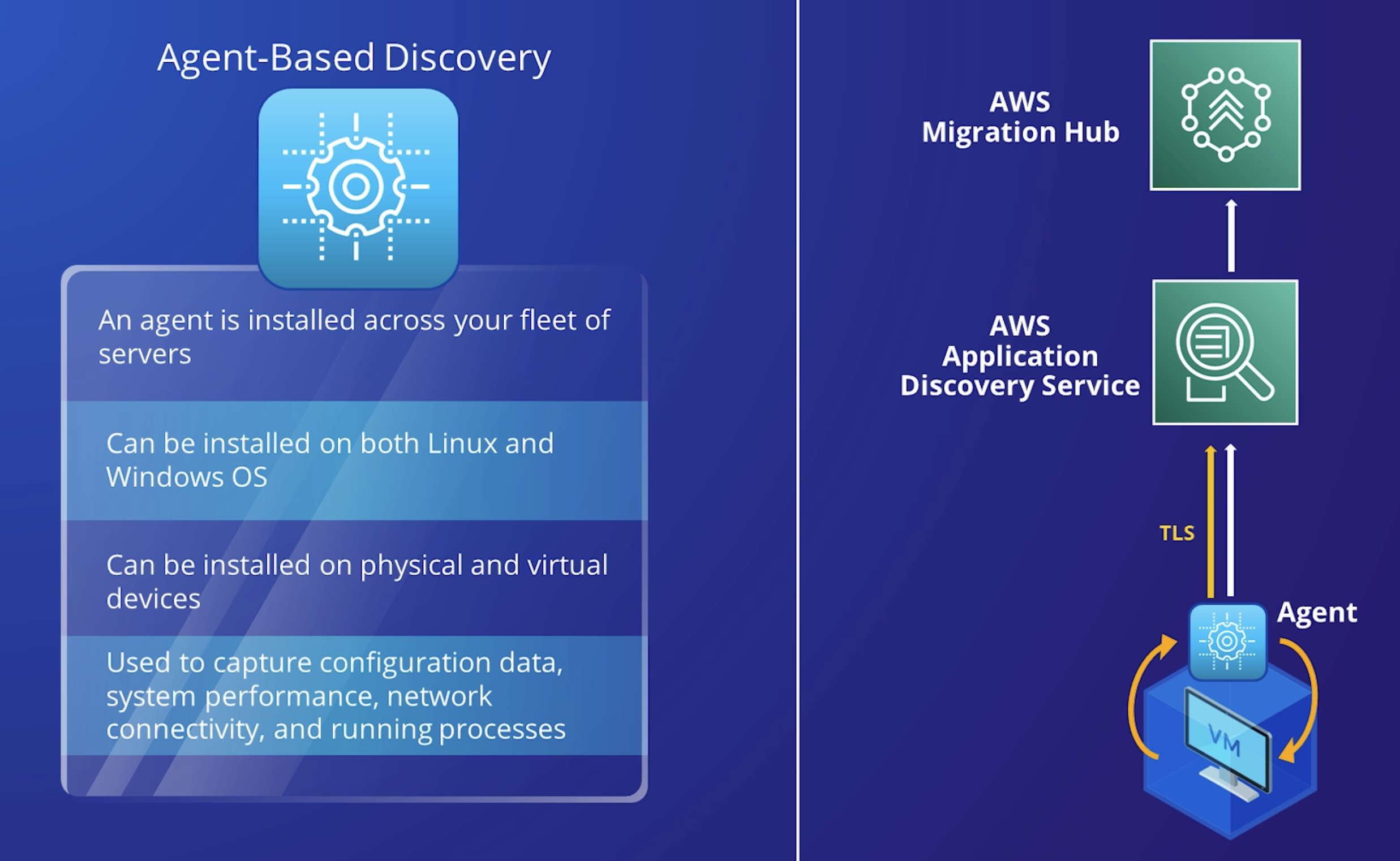
  • AWS Application Discovery Agent โ€“ The Discovery Agent is AWS software that you install on your on-premises servers and VMs to capture system configuration, system performance, running processes, and details of the network connections between systems.

Agent Based

Agents support most Linux and Windows operating systems, and you can deploy them on physical on-premises servers, Amazon EC2 instances, and virtual machines.

  • Migration Evaluator Collector โ€“ Migration Evaluator is a migration assessment service that helps you create a directional business case for AWS cloud planning and migration. The information that the Migration Evaluator collects includes server profile information (for example, OS, number of CPUs, amount of RAM), SQL Server metadata (for example, version and edition), utilization metrics, and network connections.

  • Migration Hub import โ€“ With Migration Hub import, you can import information about your on-premises servers and applications into Migration Hub, including server specifications and utilization data. You can also use this data to track the status of application migrations.

Manipulating Tables with Delta Lake ๐ŸŸ

In this blog post, weโ€™re going to explore how to effectively manage and manipulate tables using Delta Lake. Whether you're new to Delta Lake or need a refresher, this hands-on guide will take you through the essential operations needed to work with Delta tables.

From creating tables to updating and deleting records, weโ€™ve got you covered! So, letโ€™s dive in and get started! ๐Ÿš€

Learning Objectives ๐Ÿงฉ

By the end of this lab, you should be able to execute standard operations to create and manipulate Delta Lake tables, including:

  • Creating tables
  • Inserting data
  • Selecting records
  • Updating values
  • Deleting rows
  • Merging data
  • Dropping tables

Setup โš™๏ธ

Before we jump into the fun part, letโ€™s clear out any previous runs of this notebook and set up the necessary environment. Run the script below to reset and prepare everything.

%run ../Includes/Classroom-Setup-2.2L

Create Table โž•

We'll kick things off by creating a Delta Lake table that will track our favorite beans collection. The table will include a few basic fields to describe each bean.

Field Name Field type
name STRING
color STRING
grams FLOAT
delicious BOOLEAN

Letโ€™s go ahead and create the beans table with the following schema:

create table beans 
(name string, color string, grams float, delicious boolean)

Note

We'll use Python to run checks occasionally throughout the lab. The following cell will return as error with a message on what needs to change if you have not followed instructions. No output from cell execution means that you have completed this step.

assert spark.table("beans"), "Table named `beans` does not exist"
assert spark.table("beans").columns == ["name", "color", "grams", "delicious"], "Please name the columns in the order provided above"
assert spark.table("beans").dtypes == [("name", "string"), ("color", "string"), ("grams", "float"), ("delicious", "boolean")], "Please make sure the column types are identical to those provided above"

Insert Data ๐Ÿ“‡

Next, letโ€™s populate the table with some data. The following SQL command will insert three records into our table.

INSERT INTO beans VALUES
("black", "black", 500, true),
("lentils", "brown", 1000, true),
("jelly", "rainbow", 42.5, false)

To make sure that the data was inserted correctly, letโ€™s query the table to review the contents:

select * from beans

Now, letโ€™s add a few more records in one transaction:

insert into beans values
('pinto', 'brown', 1.5, true),
('green', 'green', 178.3, true),
('beanbag chair', 'white', 40000, false)

Verify the data is in the correct state using the cell below:

assert spark.conf.get("spark.databricks.delta.lastCommitVersionInSession") == "2", "Only 3 commits should have been made to the table"
assert spark.table("beans").count() == 6, "The table should have 6 records"
assert set(row["name"] for row in spark.table("beans").select("name").collect()) == {'beanbag chair', 'black', 'green', 'jelly', 'lentils', 'pinto'}, "Make sure you have not modified the data provided"

Update Records ๐Ÿ“ข

Now, let's update some of our data. A friend pointed out that jelly beans are, in fact, delicious. Letโ€™s update the delicious column for jelly beans to reflect this new information.

UPDATE beans
SET delicious = true
WHERE name = "jelly"

You also realize that the weight for the pinto beans was entered incorrectly. Letโ€™s update the weight to the correct value of 1500 grams.

update beans 
set grams = 1500
where name = 'pinto'

Ensure everything is updated correctly by running the cell below:

assert spark.table("beans").filter("name='pinto'").count() == 1, "There should only be 1 entry for pinto beans"
row = spark.table("beans").filter("name='pinto'").first()
assert row["color"] == "brown", "The pinto bean should be labeled as the color brown"
assert row["grams"] == 1500, "Make sure you correctly specified the `grams` as 1500"
assert row["delicious"] == True, "The pinto bean is a delicious bean"

Delete Records โŒ

Letโ€™s say youโ€™ve decided that only delicious beans are worth tracking. Use the query below to remove any non-delicious beans from the table.

delete from beans
where delicious = false
Verify that the deletion was successful:

Run the following cell to confirm this operation was successful.

assert spark.table("beans").filter("delicious=true").count() == 5, "There should be 5 delicious beans in your table"
assert spark.table("beans").filter("delicious=false").count() == 0, "There should be 0 delicious beans in your table"
assert spark.table("beans").filter("name='beanbag chair'").count() == 0, "Make sure your logic deletes non-delicious beans"

Merge Records โ›™

Your friend brought some new beans! Weโ€™ll register these new beans as a temporary view and merge them with our existing table.

CREATE OR REPLACE TEMP VIEW new_beans(name, color, grams, delicious) AS VALUES
('black', 'black', 60.5, true),
('lentils', 'green', 500, true),
('kidney', 'red', 387.2, true),
('castor', 'brown', 25, false);


SELECT * FROM new_beans

In the cell below, use the above view to write a merge statement to update and insert new records to your beans table as one transaction.

Make sure your logic: - Match beans by name and color - Updates existing beans by adding the new weight to the existing weight - Inserts new beans only if they are delicious

merge into beans a
using new_beans b
on a.name= b.name and a.color = b.color
when matched then 
update set grams = a.grams + b.grams
when not matched and b.delicious = true then
insert *

Check your work by running the following:

version = spark.sql("DESCRIBE HISTORY beans").selectExpr("max(version)").first()[0]
last_tx = spark.sql("DESCRIBE HISTORY beans").filter(f"version={version}")
assert last_tx.select("operation").first()[0] == "MERGE", "Transaction should be completed as a merge"
metrics = last_tx.select("operationMetrics").first()[0]
assert metrics["numOutputRows"] == "3", "Make sure you only insert delicious beans"
assert metrics["numTargetRowsUpdated"] == "1", "Make sure you match on name and color"
assert metrics["numTargetRowsInserted"] == "2", "Make sure you insert newly collected beans"
assert metrics["numTargetRowsDeleted"] == "0", "No rows should be deleted by this operation"

Dropping Tables ๐Ÿ“

Finally, when you're done with a managed Delta Lake table, you can drop it, which permanently deletes the table and its underlying data. Letโ€™s write a query to drop the beans table.

drop table beans

Run the following cell to confirm the table is gone:

assert spark.sql("SHOW TABLES LIKE 'beans'").collect() == [], "Confirm that you have dropped the `beans` table from your current database"

Final Thoughts ๐Ÿค”

Working with Delta Lake tables provides immense flexibility and control when managing data, and mastering these basic operations can significantly boost your productivity.

From creating tables to merging data, these skills form the foundation of efficient data manipulation. Keep practicing, and soon, managing Delta Lake tables will feel like second nature!

Feature Engineering using Databricks ๐Ÿงฑ

The Databricks Runtime includes additional optimizations and proprietary features that build upon and extend Apache Spark, including Photon which is an optimized version of Apache Spark rewritten in C++ using vectorized query processing.

Spark Context

You donโ€™t need to worry about configuring or initializing a Spark context or Spark session, as these are managed for you by Databricks.

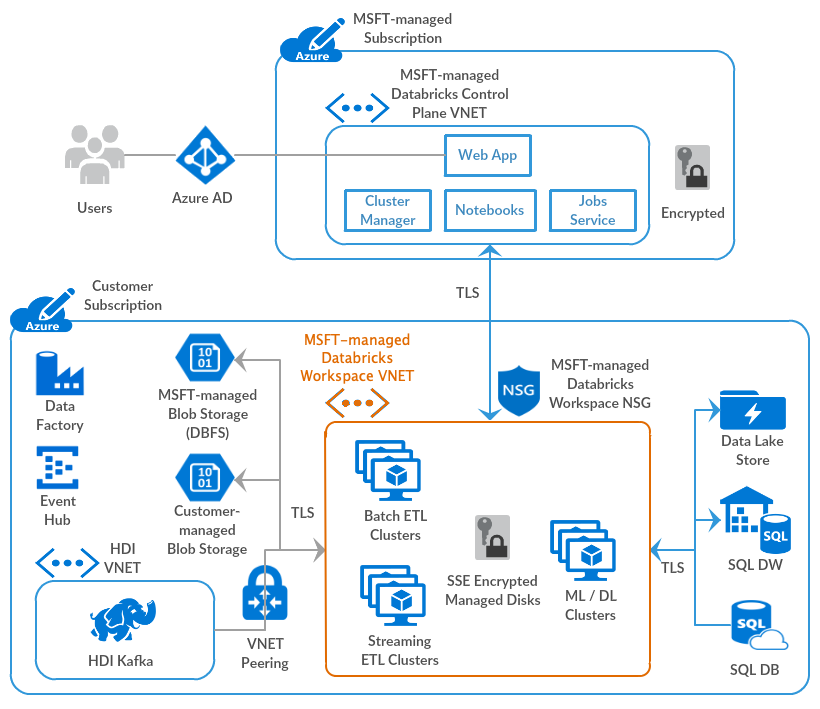
Architecture ๐Ÿ›๏ธ

Databricks operates out of a control plane and a data plane.

Image credits: Microsoft Learn

Control Plane ๐Ÿง‘โ€โœˆ๏ธ

The control plane includes the backend services that Azure Databricks manages in its own Azure account. Notebook commands and many other workspace configurations are stored in the control plane and encrypted at rest.

Data Plane ๐Ÿ‘ท

Your Azure account manages the data plane, and is where your data resides. This is also where data is processed

  • Job results reside in storage in your account.
  • Interactive notebook results are stored in a combination of the control plane (partial results for presentation in the UI) and your Azure storage. If you want interactive notebook results stored only in your cloud account storage, you can ask your Databricks representative to enable interactive notebook results in the customer account for your workspace.

Spark Concepts

DataFrame and RDD ๐Ÿงฎ

Tldr

A DataFrame is a two-dimensional labeled data structure with columns of potentially different types. You can think of a DataFrame like a spreadsheet, a SQL table, or a dictionary of series objects. Apache Spark DataFrames provide a rich set of functions (select columns, filter, join, aggregate) that allow you to solve common data analysis problems efficiently.

Apache Spark DataFrames are an abstraction built on top of Resilient Distributed Datasets (RDDs).

Use of Lazy loading in Spark Dataframe instead of Pandas

One of the key differences between Pandas and Spark dataframes is eager versus lazy execution. In PySpark, operations are delayed until a result is actually requested in the pipeline. For example, you can specify operations for loading a data set from Amazon S3 and applying a number of transformations to the dataframe, but these operations wonโ€™t be applied immediately. Instead, a graph of transformations is recorded, and once the data are actually needed, for example when writing the results back to S3, then the transformations are applied as a single pipeline operation. This approach is used to avoid pulling the full dataframe into memory, and enables more effective processing across a cluster of machines.

Spark SQL ๐ŸŒ

The term Spark SQL technically applies to all operations that use Spark DataFrames. Spark SQL replaced the Spark RDD API in Spark 2.x, introducing support for SQL queries and the DataFrame API for Python, Scala, R, and Java.

PySpark ๐Ÿ”ฅ

PySpark is the Python API for Apache Spark, an open source, distributed computing framework and set of libraries for real-time, large-scale data processing.

Databricks Concepts ๐Ÿง‘โ€๐Ÿซ

Databricks File System (DBFS)

A filesystem abstraction layer over a blob store. It contains directories, which can contain files (data files, libraries, and images), and other directories. DBFS is automatically populated with some datasets that you can use to learn Azure Databricks.

DBFS is an abstraction on top of scalable object storage that maps Unix-like filesystem calls to native cloud storage API calls.

Mount blob to DBFS ๐Ÿ“

Mounting object storage to DBFS allows you to access objects in object storage as if they were on the local file system. Mounts store Hadoop configurations necessary for accessing storage, so you do not need to specify these settings in code or during cluster configuration.

DBFS root ๐ŸŒด

The DBFS root is the default storage location for a Databricks workspace, provisioned as part of workspace creation in the cloud account containing the Databricks workspace

It is important to differentiate that DBFS is a file system used for interacting with data in cloud object storage, and the DBFS root is a cloud object storage location.

Auto Loader ๐Ÿ›บ

Tldr

Auto Loader incrementally and efficiently processes new data files as they arrive in cloud storage without any additional setup.

Auto Loader incrementally and efficiently processes new data files as they arrive in cloud storage. Auto Loader can load data files from

  • AWS S3 (s3://)
  • Azure Data Lake Storage Gen2 (ADLS Gen2, abfss://)
  • Google Cloud Storage (GCS, gs://)
  • Azure Blob Storage (wasbs://)
  • ADLS Gen1 (adl://)
  • Databricks File System (DBFS, dbfs:/)

Auto Loader can ingest JSON, CSV, PARQUET, AVRO, ORC, TEXT, and BINARYFILE file formats.

How does Auto Loader track ingestion progress?

As files are discovered, their metadata is persisted in a scalable key-value store (RocksDB) in the checkpoint location of your Auto Loader pipeline. This key-value store ensures that data is processed exactly once.

Delta Lake โ›ด๏ธ

Delta Lake is open source software that extends Parquet data files with a file-based transaction log for ACID transactions and scalable metadata handling.

Delta Lake is fully compatible with Apache Spark APIs, and was developed for tight integration with Structured Streaming, allowing you to easily use a single copy of data for both batch and streaming operations and providing incremental processing at scale.

Who created delta lake format?

Delta Lake is the default storage format for all operations on Databricks. Unless otherwise specified, all tables on Databricks are Delta tables. Databricks originally developed the Delta Lake protocol and continues to actively contribute to the open source project.

Connecting to blob/ ADLS ๐Ÿ”—

We can use the Azure Blob Filesystem driver (ABFS) to connect to Azure Blob Storage and Azure Data Lake Storage (ADLS) Gen2 from Databricks

The connection can be scoped to either 1. Databricks cluster 2. Databricks Notebook

ABFS vs WASB

The legacy Windows Azure Storage Blobdriver (WASB) has been deprecated. ABFS has numerous benefits over WASB.

Credentials walkthrough

When you enable Azure Data Lake Storage credential passthrough for your cluster, commands that you run on that cluster can read and write data in Azure Data Lake Storage without requiring you to configure service principal credentials for access to storage. Azure Data Lake Storage credential passthrough is supported with Azure Data Lake Storage Gen1 and Gen2 only. Azure Blob storage does not support credential passthrough.

Delta table ฮ”

A Delta table stores data as a directory of files on cloud object storage and registers table metadata to the metastore within a catalog and schema.

Hive metastore ๐Ÿ

The component that stores all the structure information of the various tables and partitions in the data warehouse including column and column type information, the serializers and deserializers necessary to read and write data, and the corresponding files where the data is stored.

Delta live tables ๐Ÿ––

Instead of defining your data pipelines using a series of separate Apache Spark tasks, Delta Live Tables manages how your data is transformed based on a target schema you define for each processing step.

You can also enforce data quality with Delta Live Tables expectations. Expectations allow you to define expected data quality and specify how to handle records that fail those expectations.

Authentication and authorization ๐Ÿชช

User ๐Ÿง‘โ€๐Ÿฆฐ

A unique individual who has access to the system. User identities are represented by email addresses.

Service principal โ˜ƒ๏ธ

A service identity for use with jobs, automated tools, and systems such as scripts, apps, and CI/CD platforms. Service principals are represented by an application ID.

Group ๐Ÿ 

Groups simplify identity management, making it easier to assign access to workspaces, data, and other securable objects. All Databricks identities can be assigned as members of groups.

ACL โ›”๏ธ

A list of permissions attached to the workspace, cluster, job, table, or experiment. An ACL specifies which users or system processes are granted access to the objects, as well as what operations are allowed on the assets

PAT ๐Ÿ’ณ

An opaque string is used to authenticate to the REST API and by tools in the Databricks integrations to connect to SQL warehouses.

DS & Engineering Space โš™๏ธ

Workspace ๐Ÿช

A workspace is an environment for accessing all of your Azure Databricks assets. A workspace organizes objects (notebooks, libraries, dashboards, and experiments) into folders and provides access to data objects and computational resources.

Notebook ๐Ÿ”–

A web-based interface to documents that contain runnable commands, visualizations, and narrative text.

Repo ๐Ÿ“ฆ

A folder whose contents are co-versioned together by syncing them to a remote Git repository.

Databricks Workflow โณ

Azure Databricks Workflows orchestrates data processing, machine learning, and analytics pipelines in the Azure Databricks Lakehouse Platform.

Workflows has fully managed orchestration services integrated with the Azure Databricks platform, including Azure Databricks Jobs to run non-interactive code in your Azure Databricks workspace and Delta Live Tables to build reliable and maintainable ETL pipelines.

SCC/NPIP ๐ŸŽญ

Secure cluster connectivity is also known as No Public IP (NPIP).

Tldr

With secure cluster connectivity enabled, customer virtual networks have no open ports and Databricks Runtime cluster nodes in the classic compute plane have no public IP addresses.

  • At a network level, each cluster initiates a connection to the control plane secure cluster connectivity relay during cluster creation. The cluster establishes this connection using port 443 (HTTPS) and uses a different IP address than is used for the Web application and REST API.

  • When the control plane logically starts new Databricks Runtime jobs or performs other cluster administration tasks, these requests are sent to the cluster through this tunnel.

  • The compute plane (the VNet) has no open ports, and Databricks Runtime cluster nodes have no public IP addresses.

Delta Lake ๐ŸŸ

  • Delta Lake is the optimized storage layer that provides the foundation for storing data and tables in the Databricks lakehouse.
  • Delta Lake is open source software that extends Parquet data files with a file-based transaction log for ACID transactions and scalable metadata handling.
  • Delta Lake is fully compatible with Apache Spark APIs, and was developed for tight integration with Structured Streaming, allowing you to easily use a single copy of data for both batch and streaming operations and providing incremental processing at scale.

The default format

Delta Lake is the default storage format for all operations on Azure Databricks. Unless otherwise specified, all tables on Azure Databricks are Delta tables. Databricks originally developed the Delta Lake protocol and continues to actively contribute to the open source project.

Delta Table ๐Ÿงฉ

A Delta table stores data as a directory of files on cloud object storage and registers table metadata to the metastore within a catalog and schema.

DBFS ๐Ÿ—„๏ธ

The Databricks File System (DBFS) is a ==distributed file system= mounted into an Azure Databricks workspace and available on Azure Databricks clusters. DBFS is an abstraction on top of scalable object storage that maps Unix-like filesystem calls to native cloud storage API calls.

So what is DBFS root?

The DBFS root is the default storage location for an Azure Databricks workspace, provisioned as part of workspace creation in the cloud account containing the Azure Databricks workspace. it is important to differentiate that DBFS is a file system used for interacting with data in cloud object storage, and the DBFS root is a cloud object storage location

Unity Catalog Metastore ๐Ÿงญ

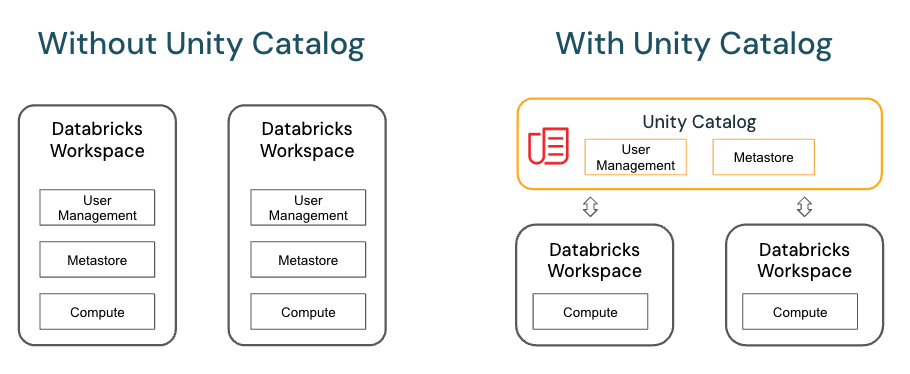
Unity Catalog provides centralized access control, auditing, lineage, and data discovery capabilities. You create Unity Catalog metastores at the Azure Databricks account level, and a single metastore can be used across multiple workspaces.

Hive Metastore (Legacy) ๐Ÿ“ฆ

Each Azure Databricks workspace includes a built-in Hive metastore as a managed service. An instance of the metastore deploys to each cluster and securely accesses metadata from a central repository for each customer workspace.

The Hive metastore provides a less centralized data governance model than Unity Catalog. By default, a cluster allows all users to access all data managed by the workspaceโ€™s built-in Hive metastore unless table access control is enabled for that cluster.

Catalog ๐Ÿ“•

  • A catalog is the highest abstraction (or coarsest grain) in the Databricks lakehouse relational model.
  • Every database will be associated with a catalog.
  • Catalogs exist as objects within a metastore.

Before the introduction of Unity Catalog, Azure Databricks used a two-tier namespace. Catalogs are the third tier in the Unity Catalog namespacing model:

catalog_name.database_name.table_name

SCIM ๐Ÿ”

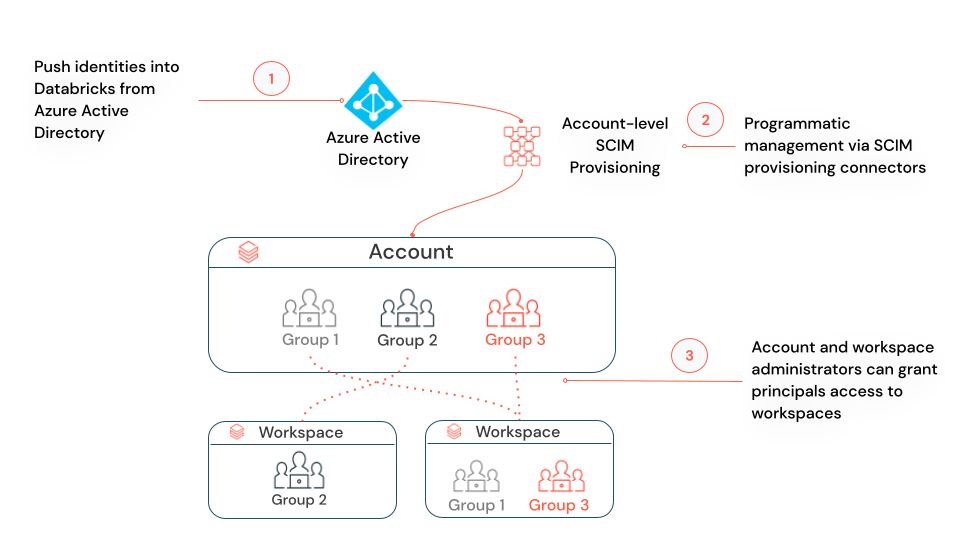
SCIM (System for Cross-domain Identity Management) lets you use an identity provider (IdP) to create users in Azure Databricks, give them the proper level of access, and remove access (deprovision them) when they leave your organization or no longer need access to Azure Databricks.

You can either configure one SCIM provisioning connector from Microsoft Entra ID (formerly Azure Active Directory) to your Azure Databricks account, using account-level SCIM provisioning, or configure separate SCIM provisioning connectors to each workspace, using workspace-level SCIM provisioning.

Account-level SCIM provisioning: Azure Databricks recommends that you use account-level SCIM provisioning to create, update, and delete all users from the account. You manage the assignment of users and groups to workspaces within Databricks. Your workspaces must be enabled for identity federation to manage usersโ€™ workspace assignments.

Workspace-level SCIM provisioning (public preview): If none of your workspaces is enabled for identity federation, or if you have a mix of workspaces, some enabled for identity federation and others not, you must manage account-level and workspace-level SCIM provisioning in parallel. In a mixed scenario, you donโ€™t need workspace-level SCIM provisioning for any workspaces that are enabled for identity federation.

Unity Catalog โš›๏ธ

Unity Catalog provides centralized access control, auditing, lineage, and data discovery capabilities across Azure Databricks workspaces.

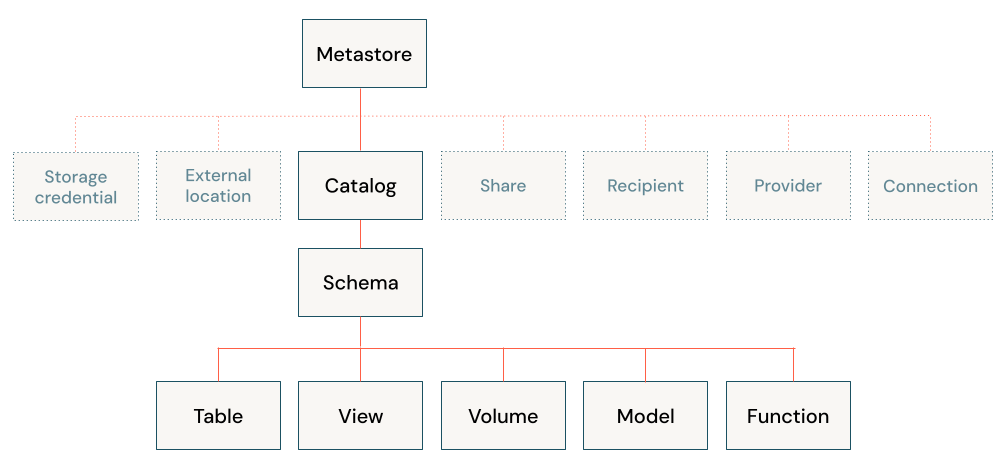
In Unity Catalog, the hierarchy of primary data objects flows from metastore to table or volume:

  • Metastore: The top-level container for metadata. Each metastore exposes a three-level namespace (catalog.schema.table) that organizes your data.
  • Catalog: The first layer of the object hierarchy, used to organize your data assets.
  • Schema: Also known as databases, schemas are the second layer of the object hierarchy and contain tables and views.
  • Tables, views, and volumes: At the lowest level in the object hierarchy are tables, views, and volumes. Volumes provide governance for non-tabular data.

Unity Catalog object model diagram

3 level namespace

You reference all data in Unity Catalog using a three-level namespace: catalog.schema.asset, where asset can be a table, view, or volume.

Metastores ๐Ÿฌ

  • A metastore is the top-level container of objects in Unity Catalog.
  • It registers metadata about data and AI assets and the permissions that govern access to them.
  • Azure Databricks account admins should create one metastore for each region in which they operate and assign them to Azure Databricks workspaces in the same region.
  • For a workspace to use Unity Catalog, it must have a Unity Catalog metastore attached.

External tables โ€ผ๏ธ

External tables are tables whose data lifecycle and file layout are not managed by Unity Catalog. Use external tables to register large amounts of existing data in Unity Catalog, or if you require direct access to the data using tools outside of Azure Databricks clusters or Databricks SQL warehouses.

Dropping an External Table

When you drop an external table, Unity Catalog does not delete the underlying data. You can manage privileges on external tables and use them in queries in the same way as managed tables.

IP access lists โš ๏ธ

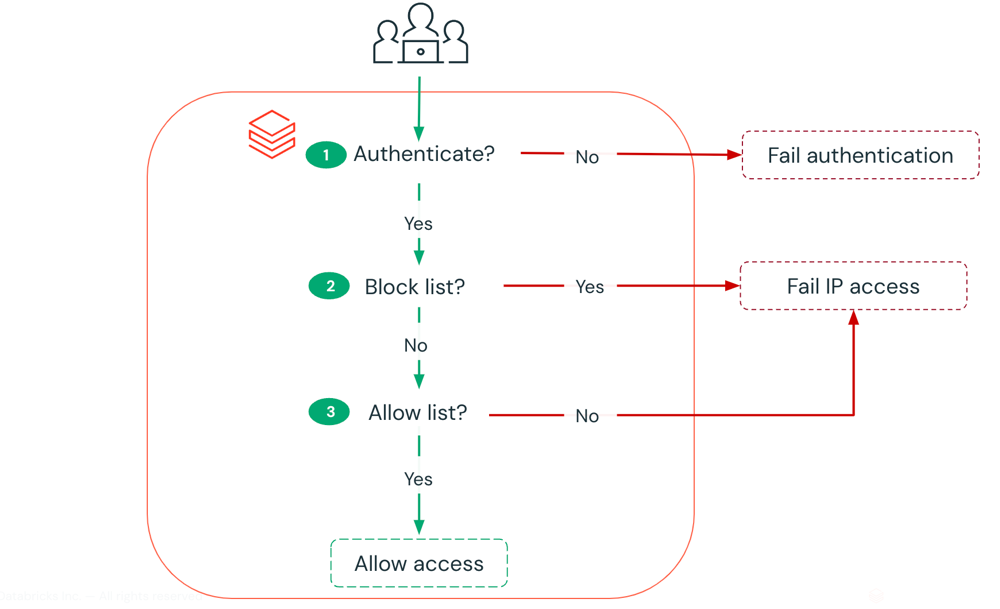
IP access lists enable you to restrict access to your Azure Databricks account and workspaces based on a userโ€™s IP address. For example, you can configure IP access lists to allow users to connect only through existing corporate networks with a secure perimeter. If the internal VPN network is authorized, users who are remote or traveling can use the VPN to connect to the corporate network. If a user attempts to connect to Azure Databricks from an insecure network, like from a coffee shop, access is blocked.

IP Access list access check process

UDR/ Custom route ๐Ÿš—

If your Azure Databricks workspace is deployed to your own virtual network (VNet), you can use custom routes, also known as user-defined routes (UDR), to ensure that network traffic is routed correctly for your workspace. For example, if you connect the virtual network to your on-premises network, traffic may be routed through the on-premises network and unable to reach the Azure Databricks control plane. User-defined routes can solve that problem

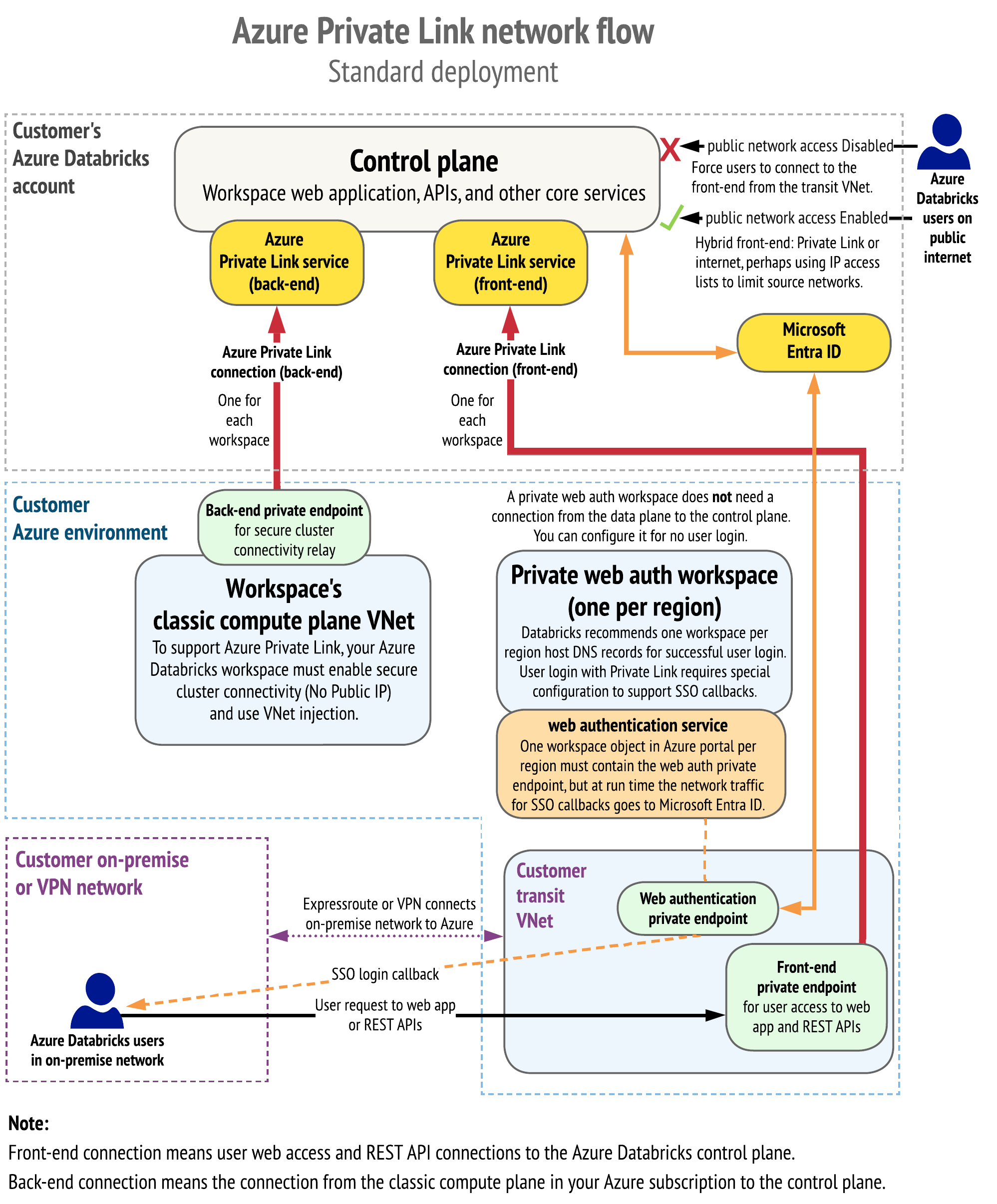
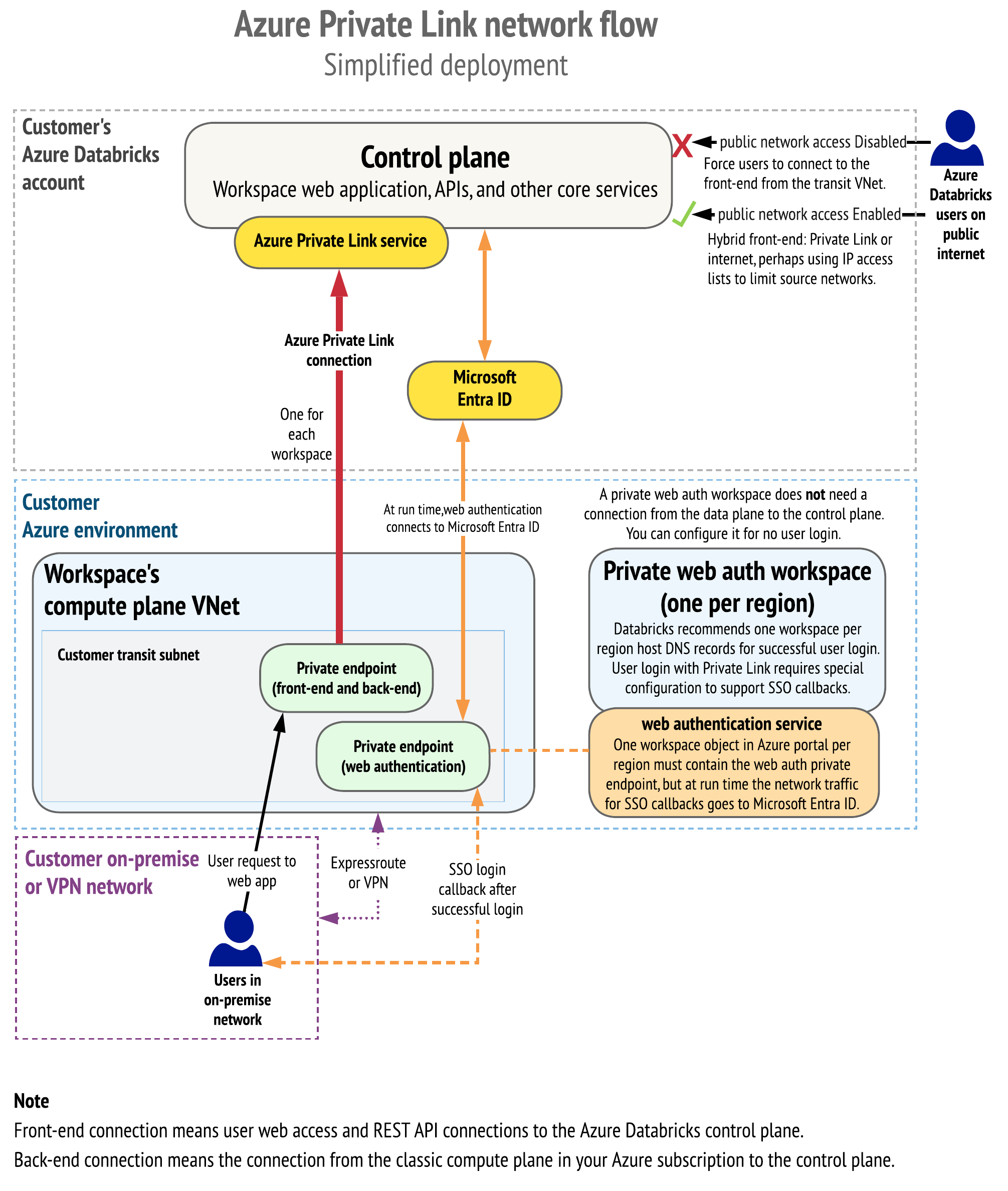
Private Link provides private connectivity from Azure VNets and on-premises networks to Azure services without exposing the traffic to the public network. Azure Databricks supports the following Private Link connection types:

  1. Front-end Private Link (also known as user to workspace): A front-end Private Link connection allows users to connect to the Azure Databricks web application, REST API, and Databricks Connect API over a VNet interface endpoint. The front-end connection is also used by JDBC/ODBC and PowerBI integrations. The network traffic for a front-end Private Link connection between a transit VNet and the workspace control plane traverses over the Microsoft backbone network.

  2. Back-end Private Link (also known as compute plane to control plane): Databricks Runtime clusters in a customer-managed VNet (the compute plane) connect to an Azure Databricks workspaceโ€™s core services (the control plane) in the Azure Databricks cloud account. This enables private connectivity from the clusters to the secure cluster connectivity relay endpoint and REST API endpoint.

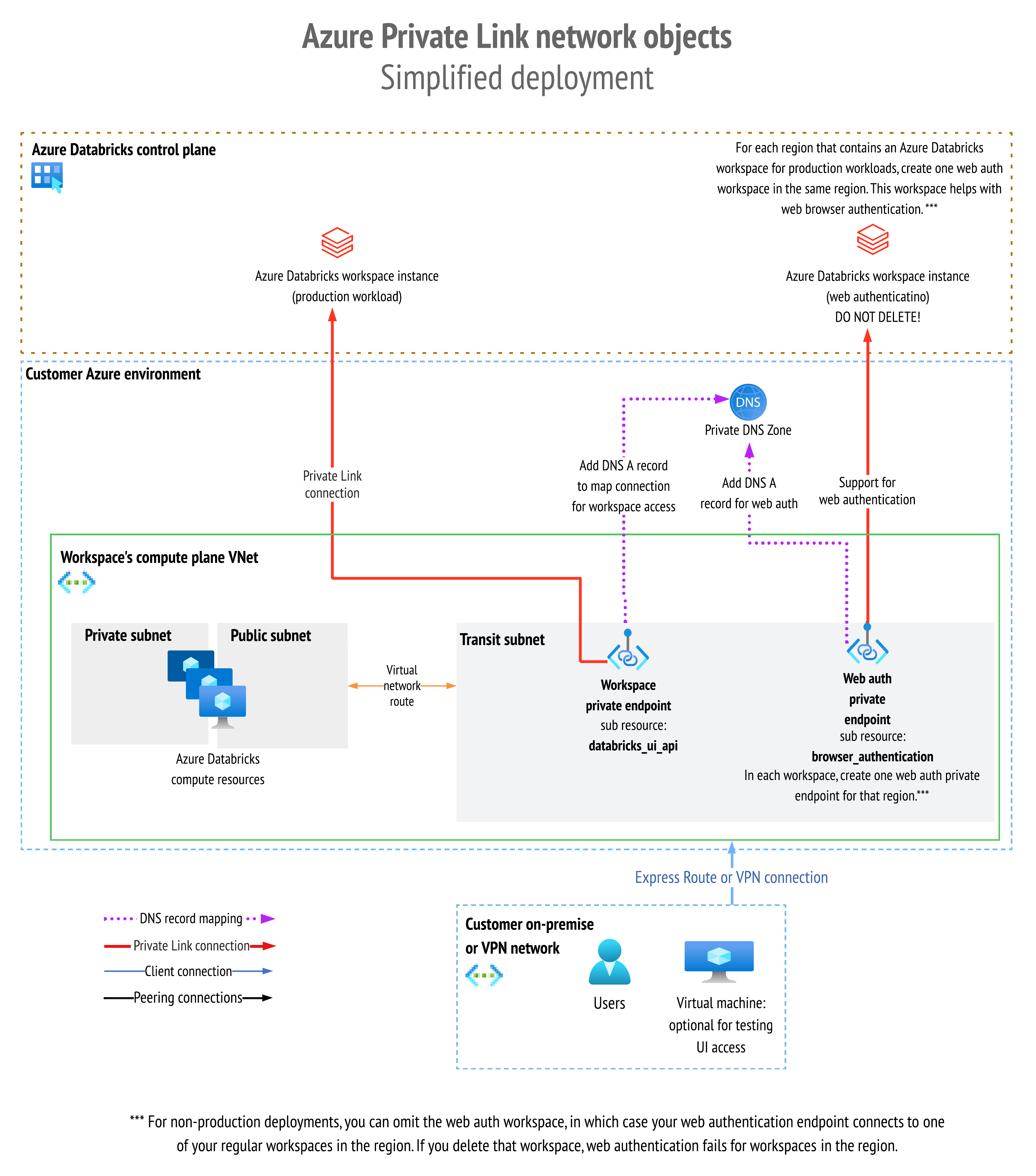
  3. Browser authentication private endpoint: To support private front-end connections to the Azure Databricks web application for clients that have no public internet connectivity, you must add a browser authentication private endpoint to support single sign-on (SSO) login callbacks to the Azure Databricks web application from Microsoft Entra ID (formerly Azure Active Directory). If you allow connections from your network to the public internet, adding a browser authentication private endpoint is recommended but not required. A browser authentication private endpoint is a private connection with sub-resource type browser_authentication.

Unity Catalog object model diagram

On-Prem connectivity ๐Ÿข

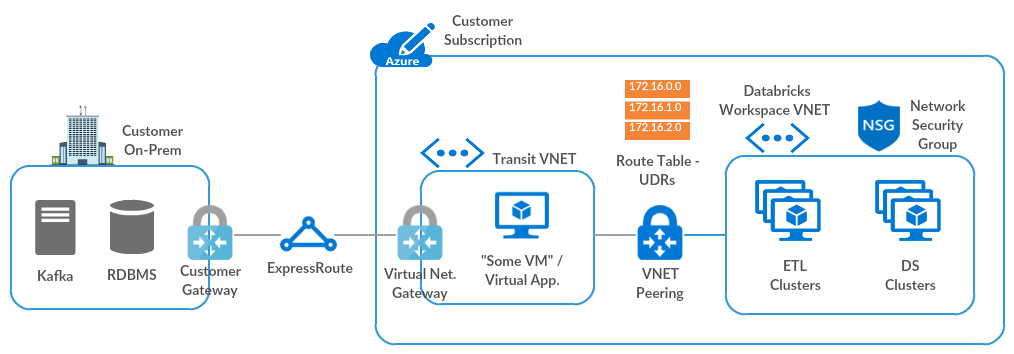
Traffic is routed via a transit virtual network (VNet) to the on-premises network, using the following hub-and-spoke topology.

On Prem connectivity diagram

The following diagram shows the network flow in a typical implementation of the Private Link simplified deployment:

Private Link simplified deployment

The following diagram shows the network object architecture:

Network object architecture

Workflows โณ

Azure Databricks Workflows orchestrates data processing, machine learning, and analytics pipelines on the Databricks Data Intelligence Platform. Workflows has fully managed orchestration services integrated with the Databricks platform, including Azure Databricks Jobs to run non-interactive code in your Azure Databricks workspace and Delta Live Tables to build reliable and maintainable ETL pipelines.

Jobs ๐Ÿ‘จโ€๐ŸŽจ

  • An Azure Databricks job is a way to run your data processing and analysis applications in an Azure Databricks workspace.

  • Your job can consist of a single task or can be a large, multi-task workflow with complex dependencies.

  • Azure Databricks manages the task orchestration, cluster management, monitoring, and error reporting for all of your jobs.

  • You can run your jobs immediately, periodically through an easy-to-use scheduling system, whenever new files arrive in an external location, or continuously to ensure an instance of the job is always running.

  • You can also run jobs interactively in the notebook UI.

Apache Flink is a powerful framework and distributed processing engine that helps manage massive data streams and batch data. Whether you're just getting started or already familiar with stream processing, Flink has a place in your data pipeline. Let's walk through the process of installing Apache Flink on a Unix-like environment, specifically for Mac or Ubuntu users.

Building Apache Flink on your machine can seem daunting, but with the right steps, you can get it up and running in no time. Typically, the installation process takes about 30 minutes.

To set up Apache Flink on your system, follow these steps:

  • Prepare a Unix-like environment

Ensure you're working in a Unix-like environment such as Linux, Mac OS X, or Cygwin.

  • Install Git

If Git is not installed, you'll need it to clone the Flink repository.

  • Verify Java installation

Apache Flink requires Java. Check if Java is installed by running the following command in your terminal:

java -version

If it's not installed, you'll need to install it before proceeding.

  • Install Maven

Maven is the build tool required for Flink. If Maven is not already installed, you can install it using Homebrew:

brew install maven

Maven plays a crucial role in the build process, so make sure this step is completed successfully.

  • Download Apache Flink

Go to the Apache Flink downloads page and download the source version. Alternatively, you can clone the Flink repository from GitHub by executing the following command in your terminal:

git clone https://github.com/apache/flink
  • Unpack the downloaded file
    After downloading, navigate to the directory where the file is located and unpack the .tgz file using the following command:
tar xzf *.tgz

Here, * represents the downloaded file name. On Mac, you can also double-click the tar file to unzip it.

  • Build Apache Flink

Once the file is unpacked, change to the directory of the extracted content and start the build process by running the command:

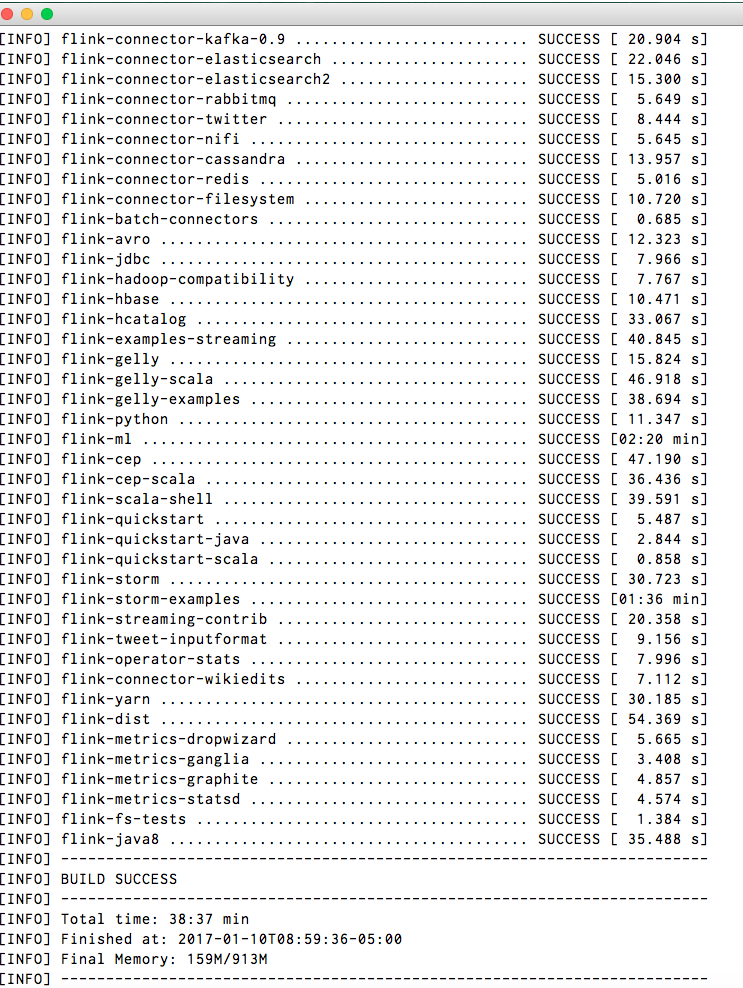
mvn clean install -DskipTests

The build process will take around 30 minutes. Once complete, if everything runs smoothly, you'll see a success message indicating that Apache Flink has been built successfully.

Installation Success

  • Check the Installation Path

After installation, you can find Apache Flink installed at the following location on your system (replace YOUR_USER_NAME with your actual username):

/Users/YOUR_USER_NAME/.m2/repository/org/apache/flink

Success

Congratulations! You've successfully built Apache Flink on your system. ๐ŸŽ‰

Final Thoughts ๐Ÿ’ก

Installing Apache Flink may seem complex at first, but by following these steps carefully, youโ€™ll have a fully functional setup in no time. Flink's powerful data processing capabilities can now be harnessed to tackle real-time and batch data workloads.

Whether you're processing event streams or managing large-scale batch processing jobs, Flink is now at your fingertips to help you transform your data pipelines.

Happy coding! ๐Ÿš€

-->